
Releases
This release expands Wrangler to allow for more effective collaboration between multiple users. Users can now share their work with each other using a new shared workspace in Wrangler. This workspace allows everyone with the right access permissions to contribute while keeping the Wrangler UI simple and easy to use.
We are significantly expanding the portfolio of AI services you can use when building CloverDX transformations. The AIClient component (renamed from OpenAIClient) now allows you to easily use large language models (LLMs) from Anthropic (Claude models), Google (Gemini models), or Azure AI Foundry. You can also use local models via tools that provide OpenAI-compatible APIs such as Ollama.
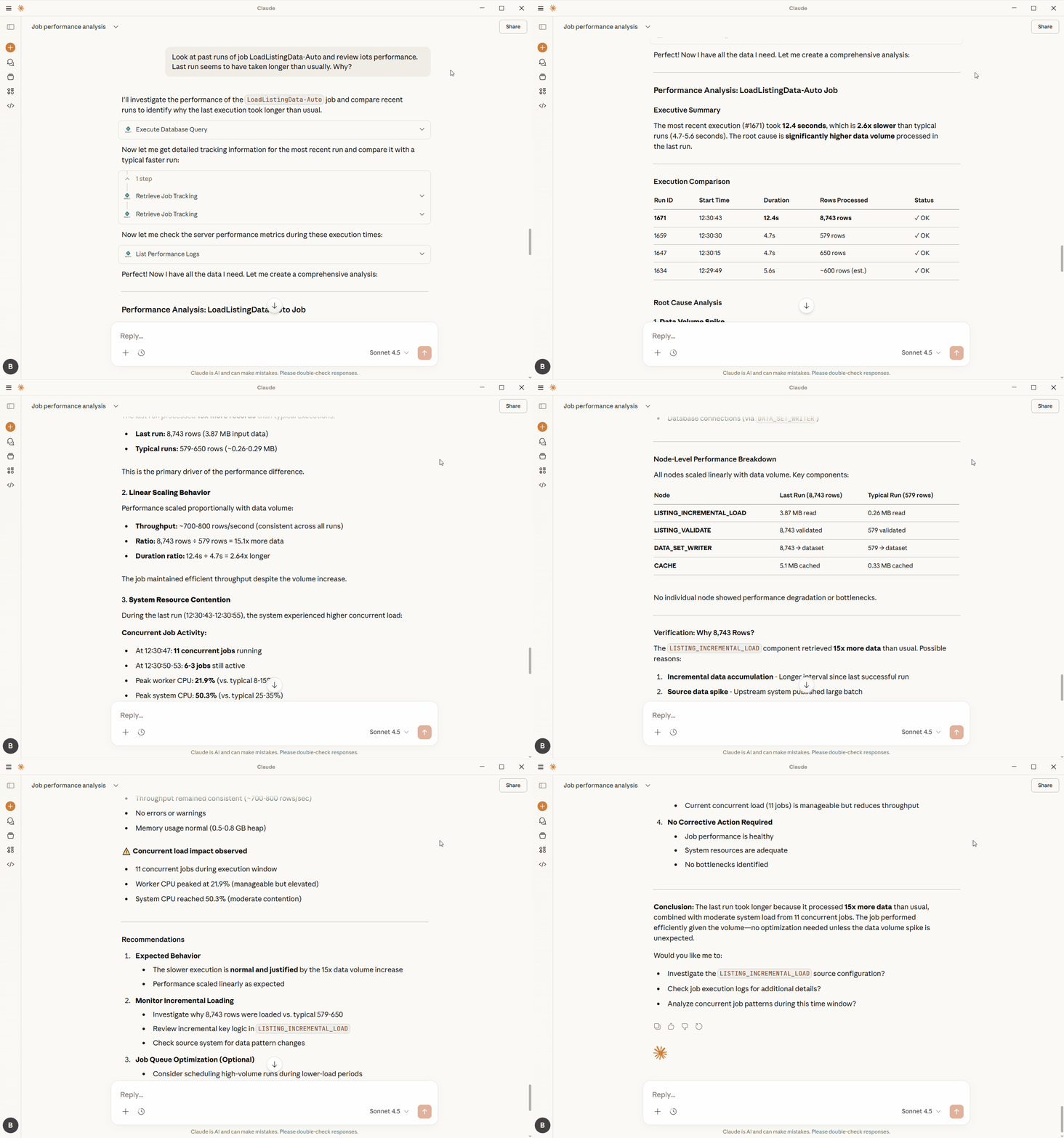
We are also introducing an AI-powered CloverDX Server diagnostics – a new approach for support and operations teams to help them manage their CloverDX instances. This is implemented in terms of MCP (Model Context Protocol) APIs which provide access to CloverDX diagnostics data to the LLM client of your choice. You can then talk to the client to monitor your CloverDX Server health, review logs to perform root cause analysis and more.
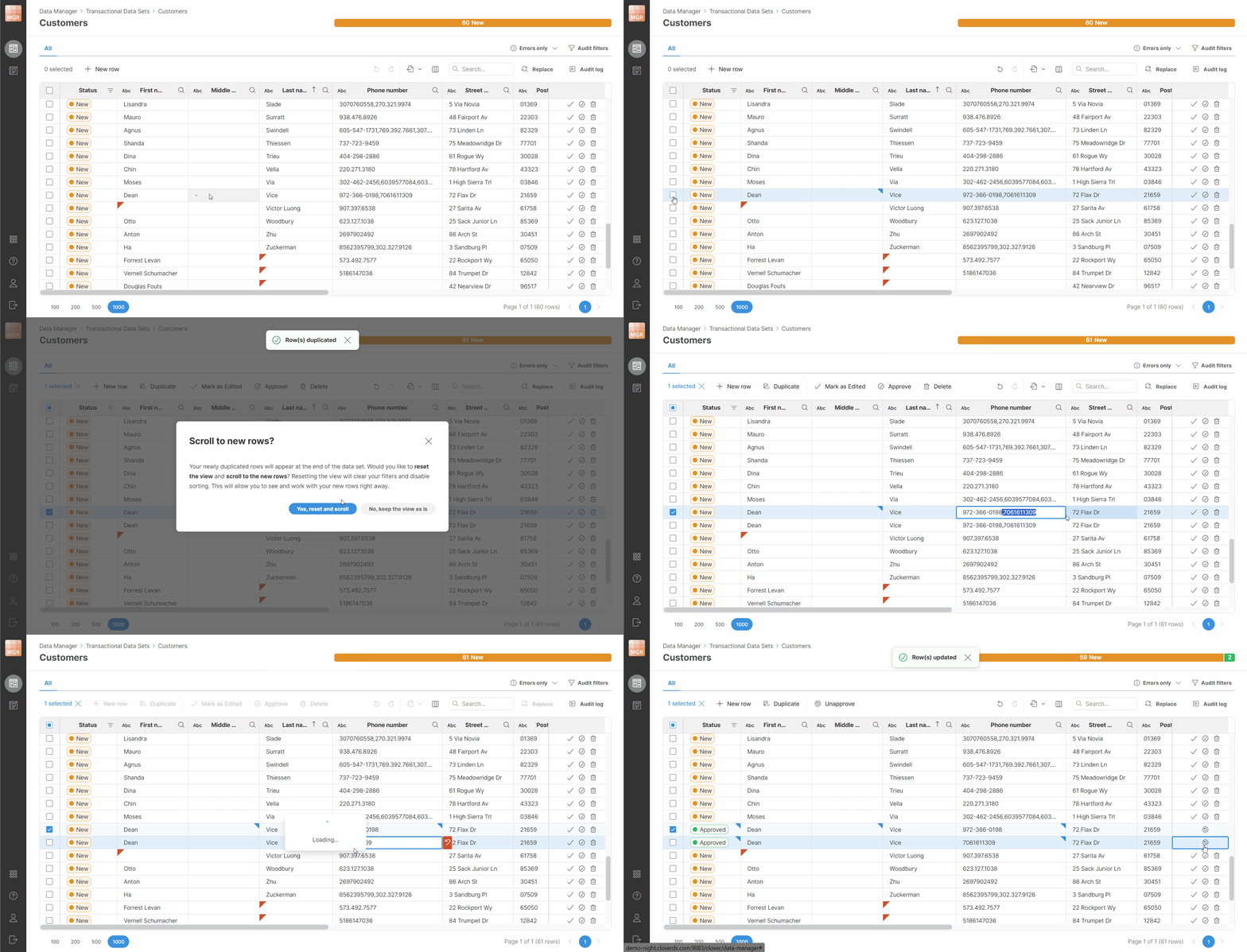
In Data Manager, you can add new rows in transactional data sets – either by duplicating an existing row or by adding a new empty row that you can edit. We’ve also made many smaller improvements that will make Data Manager more pleasant to use.
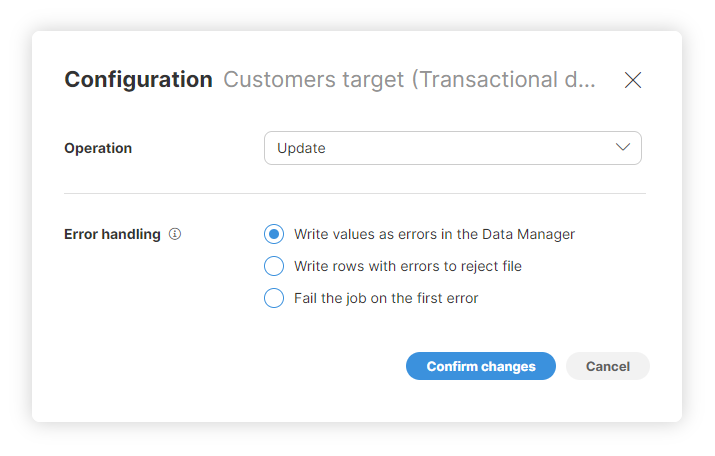
We’ve extended TransactionalDataSetWriter component to allow updates of data in transactional data sets. This is also available in Wrangler data targets which can now update transactional data sets as well. This “upsert” functionality will allow you to build more powerful and cleaner data enrichment and validation jobs in Designer or in Wrangler.
You can now enable OAuth2 authentication for Server APIs and Data Services. This will allow you to provide enhanced security for your APIs and Data Services as it will disable access via username and password.
And as always, there are many smaller improvements in CloverDX security, usability, and stability. For additional details review the following sections or a full list of changes at the bottom of these release notes.
New features in 7.3
Collaboration in Wrangler
You can now take advantage of a shared workspace to share your work with your team. The shared workspace allows everyone with the right access permissions to see or edit the jobs you created, and you’ll be able to see jobs published by others.
The following video shows how you can share a job with another user who can then see it in the shared workspace and run it right away.
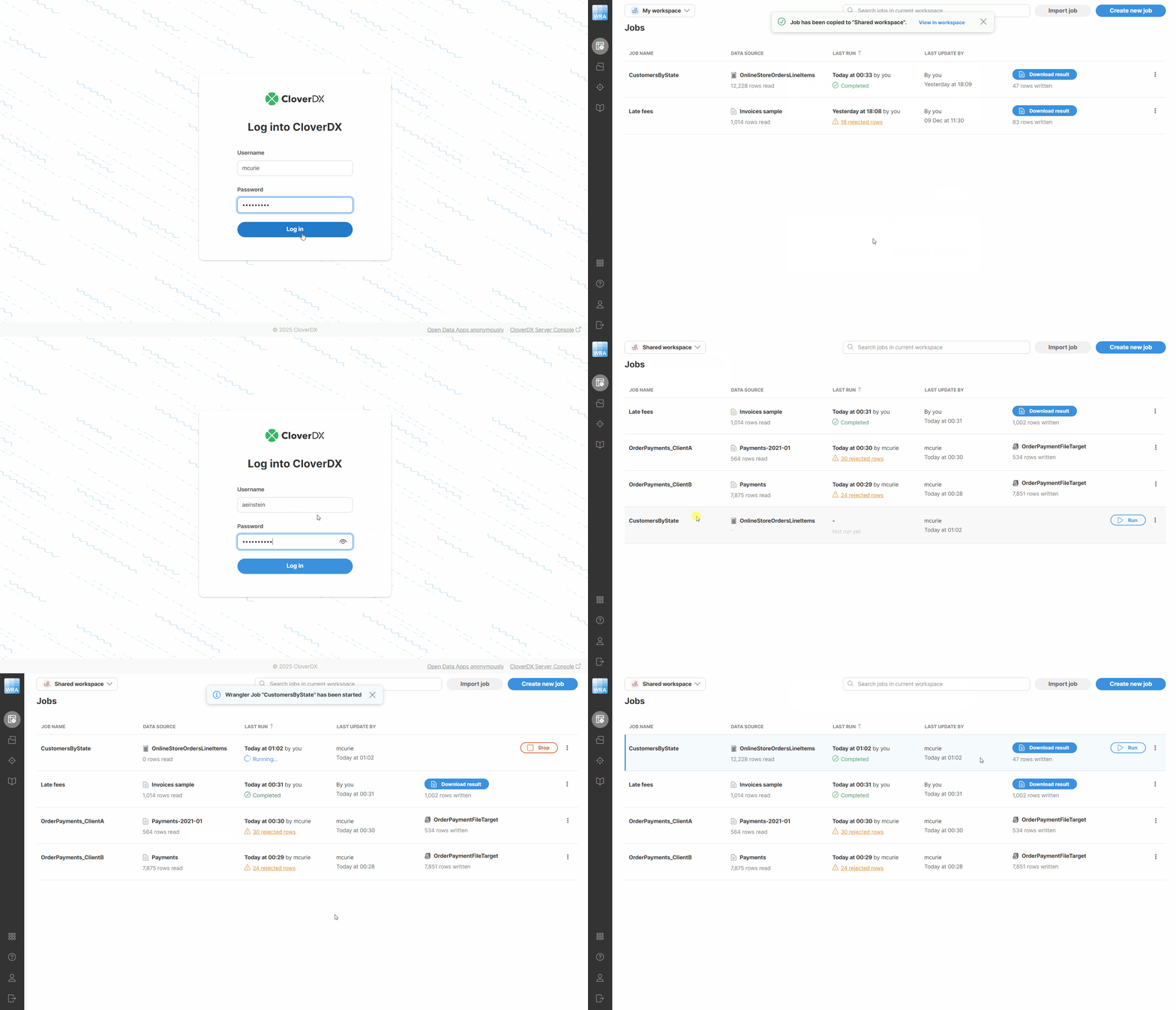
You also have your own private workspace that is not accessible or visible by other users. You can use this workspace to build jobs before sharing them with others or to keep jobs that do not need to be shared at all. This can help you keep the shared workspace clean for everyone.
The new collaboration features allow you to greatly simplify your workflow. Instead of having to export, send, and import steps that were required before, you can simply copy your jobs to shared workspace to allow others to see them.
New Wrangler steps
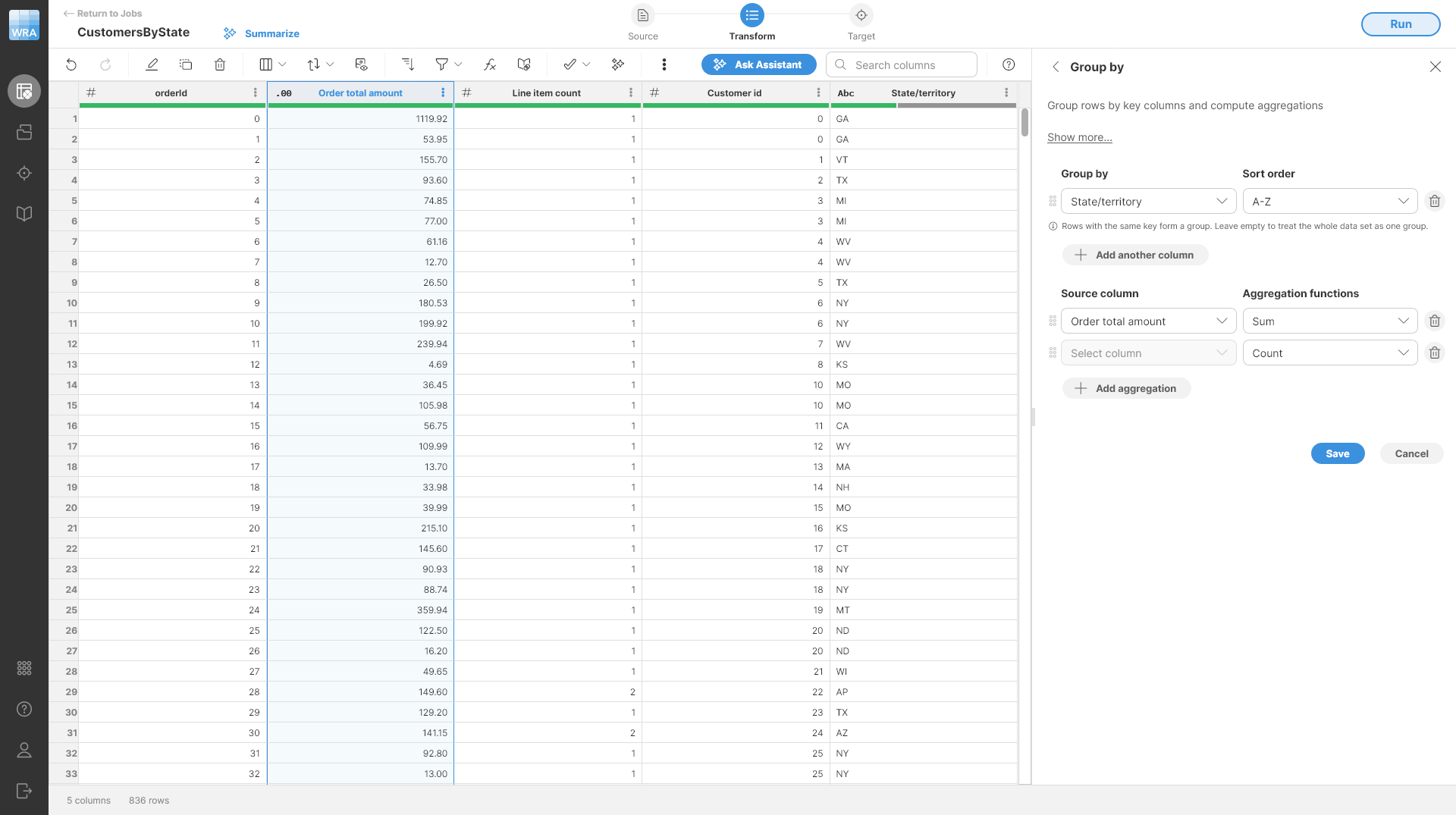
We’ve introduced three new Wrangler steps that will help you create more complex transformations – Group by, Deduplicate, and Sequence.
Group by step allows you to compute various aggregations of your data via metrics like minimum, maximum, sum, and more. The step allows you to define the grouping key, columns to aggregate and aggregation functions.
Deduplicate step allows you to remove duplicate records from your data set or to keep a number of top/bottom (first/last) rows in each group defined by the deduplication key.
And finally, the Sequence step allows you to generate artificial keys in your data sets by generating an integer sequence in any column. That way, you can create your own record identifiers as needed.
Data Manager improvements
We’ve made many changes in Data Manager in this release focusing on user experience and ease of use.
You can now add new rows to your transactional data sets in similar way like you can in reference data sets – by creating a duplicate of an existing row or by creating and populating a completely new row.
Component TransactionalDataSetWriter can now update rows in transactional data set instead of just inserting them. This will allow you to build data validation or enrichment processes that work in-place – within the same data set they are reading from.
We’ve also extended this functionality to Wrangler – data targets writing to transactional data sets can now update records instead of just inserting them.
MCP for CloverDX Server: AI-powered diagnostics
We are introducing MCP (Model Context Protocol) APIs to CloverDX Server to allow you to connect your Server with a desktop AI client such as Claude or ChatGPT. The AI client can then interact with CloverDX Server directly and query various diagnostics data such as Server health, job status and logs, various settings and more.
This allows you to “talk” to your CloverDX Server when looking at issues and the AI can help you analyze large volumes of data collected by CloverDX in its logs.
You can take advantage of CloverDX MCP even if you do not have latest version of CloverDX as your target. You need to install a special instance of CloverDX Server that will serve as proxy for MCP requests and will translate them to APIs supported by CloverDX versions before 7.3. This instance can use special free “MCP Proxy” license you can get from Customer Portal. It can also be very small (e.g. 1 CPU) and run locally on your own machine since it will not run any jobs.
The AI client will then connect with this proxy instance and will be able to query information from the older version of CloverDX. This will work on any version of CloverDX starting with CloverDX 6.0 up to CloverDX 7.2.
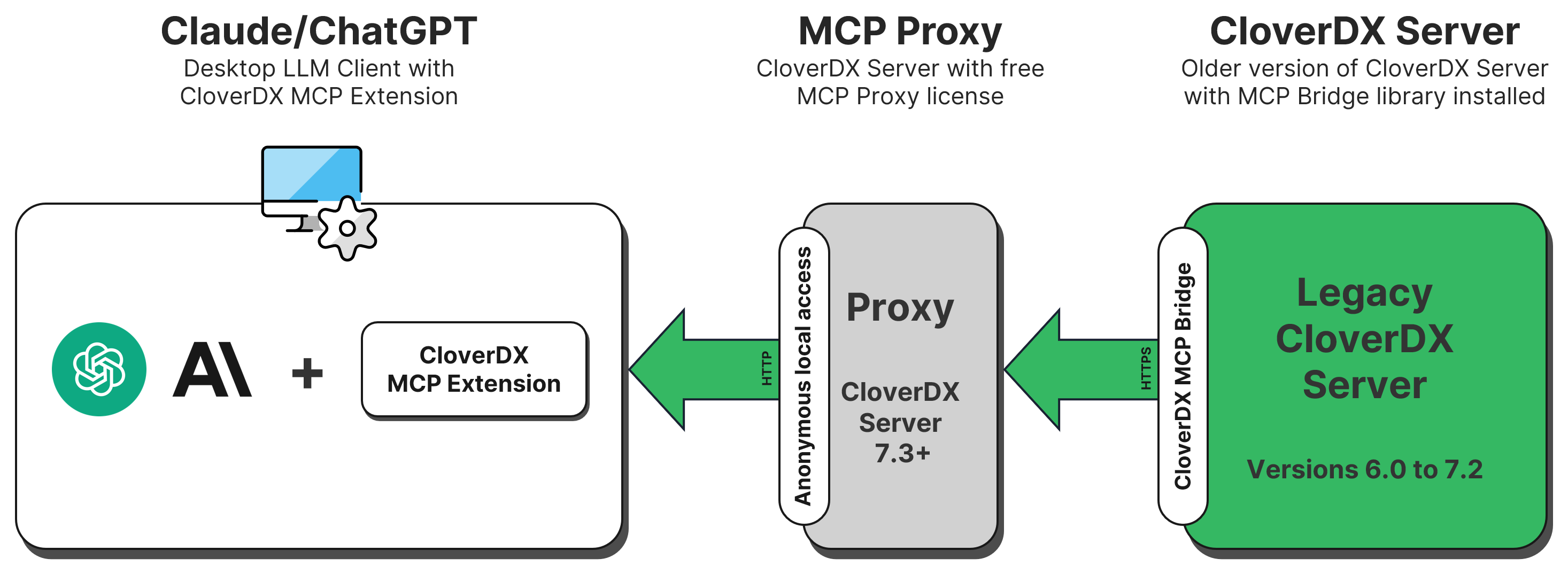
This means that you can start using MCP right now even if you cannot yet upgrade your production instance to CloverDX 7.3.
To learn more about what is supported by the MCP interface for CloverDX Server and how to set it up, please see our documentation.
AIClient component
We’ve extended the OpenAIClient component to support additional vendors and large language models. To better reflect the new expanded functionality, we renamed the component to AIClient. This change is fully backwards compatible – you do not need to modify your graphs built in previous CloverDX versions.
In this release, we’ve added the following vendors/models on top of the OpenAI models supported in previous versions of CloverDX:
- Claude by Anthropic
- Gemini by Google
- OpenAI models in Azure AI Foundry
- Other models via tools that provide OpenAI-compatible API such as Ollama
The connection to the AI provider is now configured in a separate connection dialog which allows for more flexibility when configuring the component.
We’ve also improved the CTL interface of the component to make it easier to use. Note that this change is not backwards compatible since signatures of all functions that worked with chat context now use list[ChatContext] instead of list[list[string]] to represent the context. For example, the prepareQuery function changed from
function string prepareQuery(list[list[string]] chatContext, integer iterationIndex)
to
function string prepareQuery(list[ChatMessage] chatContext, integer iterationIndex)
This change requires code changes once you upgrade CloverDX. However, the changes are quite simple refactoring and will help you have cleaner and easier to maintain code.
OAuth2 authentication for Server APIs and Data Services
To increase the security of your CloverDX Server instances, you can now switch CloverDX Server APIs and Data Services to require OAuth2 authentication when they are being called by a 3rd party client. When OAuth2 is enabled, the username and password authentication (HTTP Basic) is not allowed.
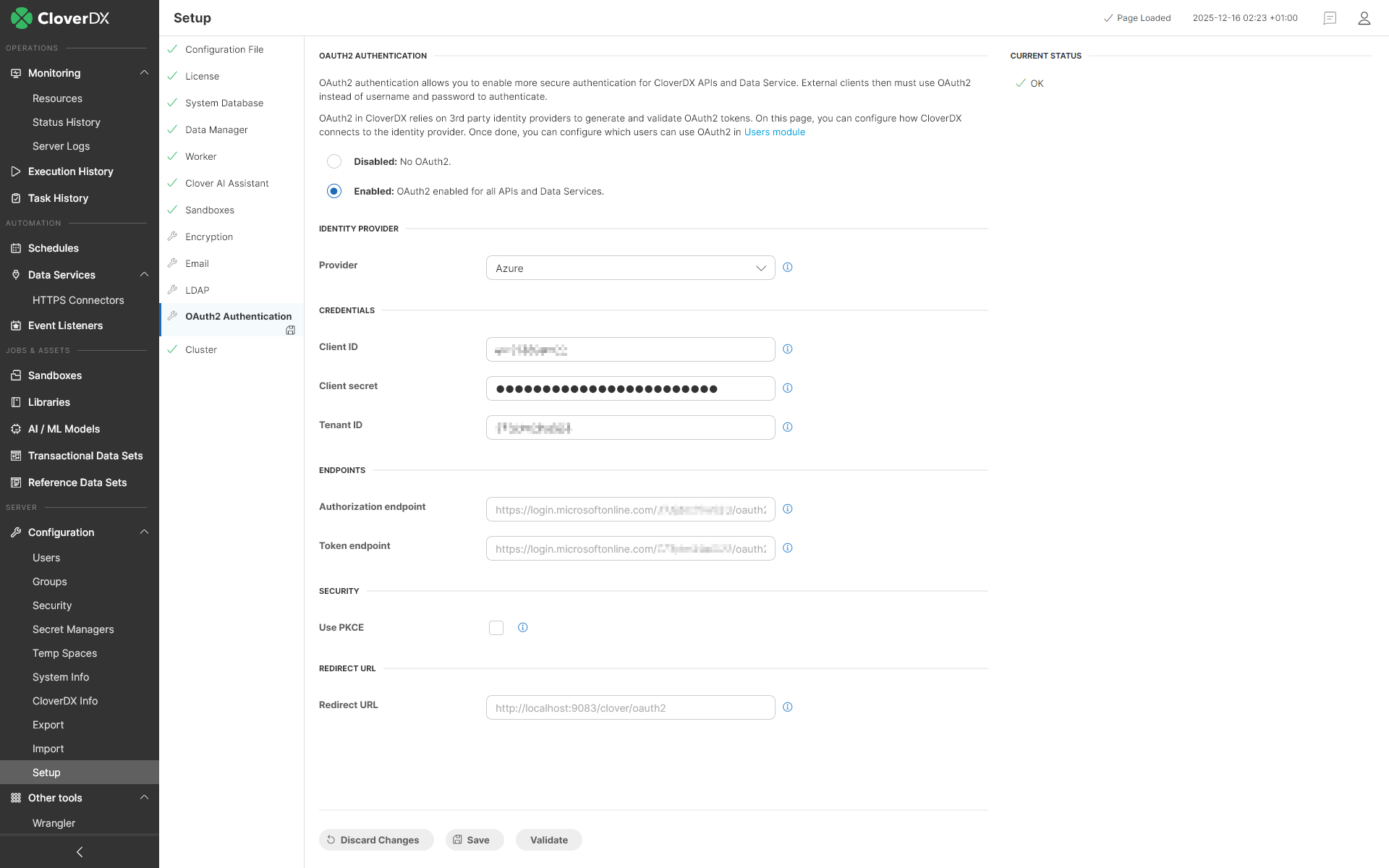
CloverDX uses 3rd party identity providers like Azure and Google to enable this feature. When calling an API or Data Service, CloverDX will call the identity provider to generate and validate authentication tokens. This approach allows you to fully integrate your CloverDX Server into your organization’s user management.
Other
Sliding window support in AITokenClassifier and AIAnonymizer components. We’ve extended these components to allow you to process text that is longer than the context length of the model. This is done by splitting the text into chunks, processing them one after another, and stitching the results back together.
Case-insensitive hash join. We’ve added an Ignore case attribute to ExtHashJoin component. This attribute allows the component to perform case insensitive comparison when performing the join. I.e., when the flag is enabled, the value “CloverDX” will match “cloverdx”. Default value is false, so the component is fully backwards compatible, and you do not need to modify your graphs to keep the behavior from previous versions of CloverDX.
Audit endpoints for Data Manager API. We’ve added two new endpoints to Data Manager’s API for each data set type: /rows/{id}/audit and /rows/search-audit (i.e., four new endpoints in total). These endpoints allow you to query or search audit records in reference or transactional data sets allowing you full visibility of changes of your data.
CTL and Wrangler function isBlank can now accept all other data types besides strings. The function will return true for non-empty value (non-null value, non-empty lists, maps, etc.) and false if the parameter is null. The behavior for string parameters has not changed, so you do not need to modify your existing graphs.
CTL function properCase and Wrangler step Proper case interpret some of the characters like : (colon) or @ (at symbol) differently – colon is no longer a word separator while @ is a word separator and it was not before. This affects how letters change case when these symbols appear as the only characters between words. The change is caused by changes in the underlying ICU library.
To help you install or upgrade to this version, we've prepared a simple checklist:
Before you upgrade
- Be sure to check the "Compatibility" notes for ALL intermediary releases. We mark all changes that can potentially alter the function of your existing transformations with a "Compatibility" label. Typically, you can safely ignore most of them, as we try hard to keep as much backwards compatibility as possible. There's a comprehensive list of all releases that will help you get the information quickly.
- Upgrade Designer and Server together. We always release Designer and Server together under a single version. It's highly recommended to upgrade Server and all Designers at the same time. Although using different versions of Designer to connect to Server might work, it is not generally supported.
- There are no incremental patches. We don't release incremental patches. Every upgrade is in fact a full installation that, if installed over the older version, will automatically update whatever is necessary in your workspaces, sandboxes, and Server databases as needed, no user data will get overwritten.
- Don't forget to backup. Although none of the above upgrade steps requires explicit backup, we recommend you always back up your work. The upgrade will keep all your transformations, jobflows, and configurations safe. However, as a good word of advice, it never hurts to have a backup.
Designer upgrade
- Download the latest version by logging into your customer account. If you lost your credentials or no longer have access there, click here to recover your password or contact our CloverCARE Support.
- Install the new version of Designer. You can install Designer over your existing installation. The process will automatically clean up the old version. Don't worry, you will NOT lose your workspaces, graphs, and transformations. However, if you installed some additional plugins to Designer (Eclipse plugins) you might need to reinstall them. Eclipse should automatically help you do that. When you start the application, point it to your existing workspace directory. With some major releases, we may notify you about upgrading the workspace to the latest version. In such cases, you won't be able to use the workspace with previous versions—be sure to upgrade ALL Designers at once if you're sharing the workspace.
- Activate the product on first start. You will need a new key as we issue new license keys for every new major version (e.g. from 4.9 to 5.0). If you're on our maintenance program, we automatically renew the keys for you. Just go to the License Keys again and copy/paste the license keys from there. If you can't find the latest keys, please contact us to renew your product maintenance.
Server upgrade:
- Download the latest version by logging into your customer account. You'll find Server in the same list as Designer downloads. If you no longer have access there, click here to recover your password or contact our CloverCARE Support.
- Plan for downtime. Upgrading Server requires downtime, so plan your upgrades in advance. If you're running multiple environments, upgrade the non-production installation first and run all your tests there first.
- Follow our step-by-step Server Upgrade Guide. We've prepared detailed instructions on how to properly shut down Server and install a new one. Server will upgrade its database and sandboxes from any previous version automatically.
- Activate the product on the login screen of Server Console. Server requires new license keys with every minor version (e.g. from 4.9 to 5.0) and we automatically renew the keys for you. Just go to the License Keys again and copy/paste the license key from there.
Please consult our Upgrading to CloverDX Server 7.0 article for additional details with more detailed overview of how to upgrade from Apache Tomcat 9 to Apache Tomcat 10.1.
| Release | Compatibility/Upgrade notes, Features & Fixes | Published | Download | ||||||||||||||||||||||||||||||||||||||||||||||||||||||||||||||||||||||||||||||||||||||||||||||||||||||||||||||||||||
|---|---|---|---|---|---|---|---|---|---|---|---|---|---|---|---|---|---|---|---|---|---|---|---|---|---|---|---|---|---|---|---|---|---|---|---|---|---|---|---|---|---|---|---|---|---|---|---|---|---|---|---|---|---|---|---|---|---|---|---|---|---|---|---|---|---|---|---|---|---|---|---|---|---|---|---|---|---|---|---|---|---|---|---|---|---|---|---|---|---|---|---|---|---|---|---|---|---|---|---|---|---|---|---|---|---|---|---|---|---|---|---|---|---|---|---|---|---|---|---|
MCP Server
Wrangler
Data Manager
AIClient
REST API
Miscellaneous
Security
Fixes
Compatibility
|
December 17, 2025 | Documentation Download CloverDX 7.3 7.3.0 | |||||||||||||||||||||||||||||||||||||||||||||||||||||||||||||||||||||||||||||||||||||||||||||||||||||||||||||||||||||
- For Developers (Improvements most useful for developers bringing new functionality or optimizations in data transformation and orchestration)
- For Administrators (Improvements or features that will help setup, install, administer and manage the platform)
- For Support (Helps staff supporting the production environment to identify and escalate potential problems or avoid such)
- For Security (Improvements and changes relevant to security focused staff – sys admins and developers alike)