
Releases
This release further continues our theme of effective collaboration between different types of users. In Wrangler, business users can now use more powerful target mappings with formulas to map their data to required target layout. At the same time, data engineers no longer need to export Wrangler jobs to include them as part of their workflow – they can use WranglerJob component to run Wrangler jobs directly as subgraphs. You can now attach Data Apps to your data sets in Data Manager helping user interact with their data in new ways.
All these features allow for more effective collaboration between business users and data engineering team.
We’ve improved AI Assistant in Wrangler – it now understands formulas better than before and can even fix various formula errors for you. Combined with the new and more powerful target mappings, the Assistant can help you build your jobs faster and more effectively.
New dynamic data preview in Wrangler allows you to see results of your step as you are editing its settings before the step is applied to your transformation. This makes it easier to see the effect of the step on your data and makes job development faster and more intuitive.
With this release we are expanding the list of supported configurations to include Windows Server 2025 Standard. At the same time, CloverDX Server now primarily runs on JDK 21 while JDK 17 is still supported.
This release also includes many other fixes and improvements in security, stability, and usability of CloverDX products. For additional details please review the full list of changes at the bottom of the release notes.
New features in 7.4
Connect Data Apps to Data Manager
Data Apps and Data Manager are frequently used together with Data Apps implementing various processes on top of data sets (e.g., data loads, ad-hoc validation, …). We’ve made this kind of usage much easier since you can now link Data Apps to your data sets and show them directly on a toolbar. This allows users to simply click on an icon to run a Data App.
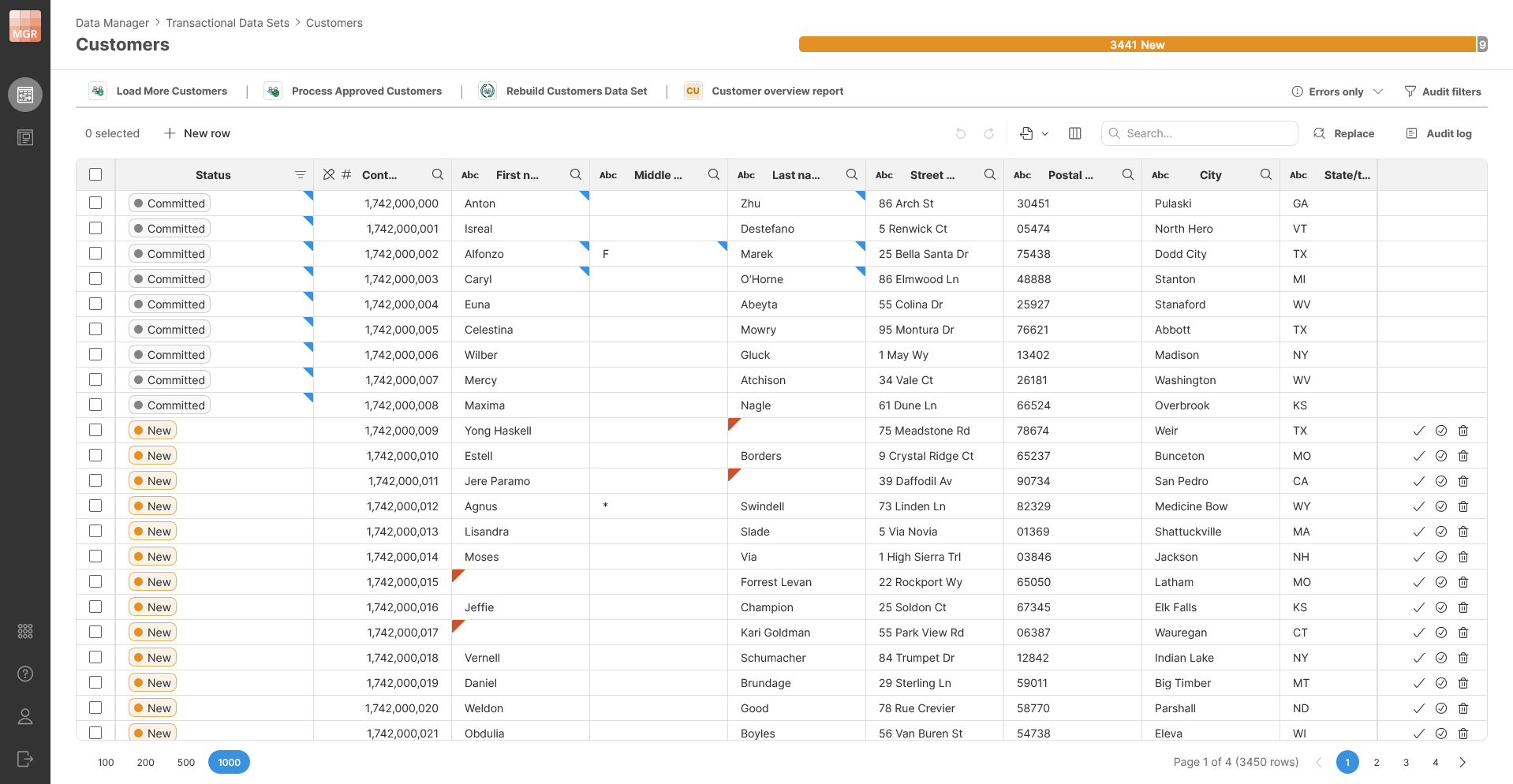
Data Apps linked to the data set behave just like every other app – they can have parameters, interact with any data and produce any kind of output as needed. Once app ends, users will see a notification that will allow them to access the app output (e.g., download a file if any, see the results and so on).
Mapping in Wrangler using Formulas
Starting with this release you can add formulas to your mapping in Wrangler jobs. This allows you to simplify your job – use fewer temporary columns and simply map your data using formula at the end of the job.
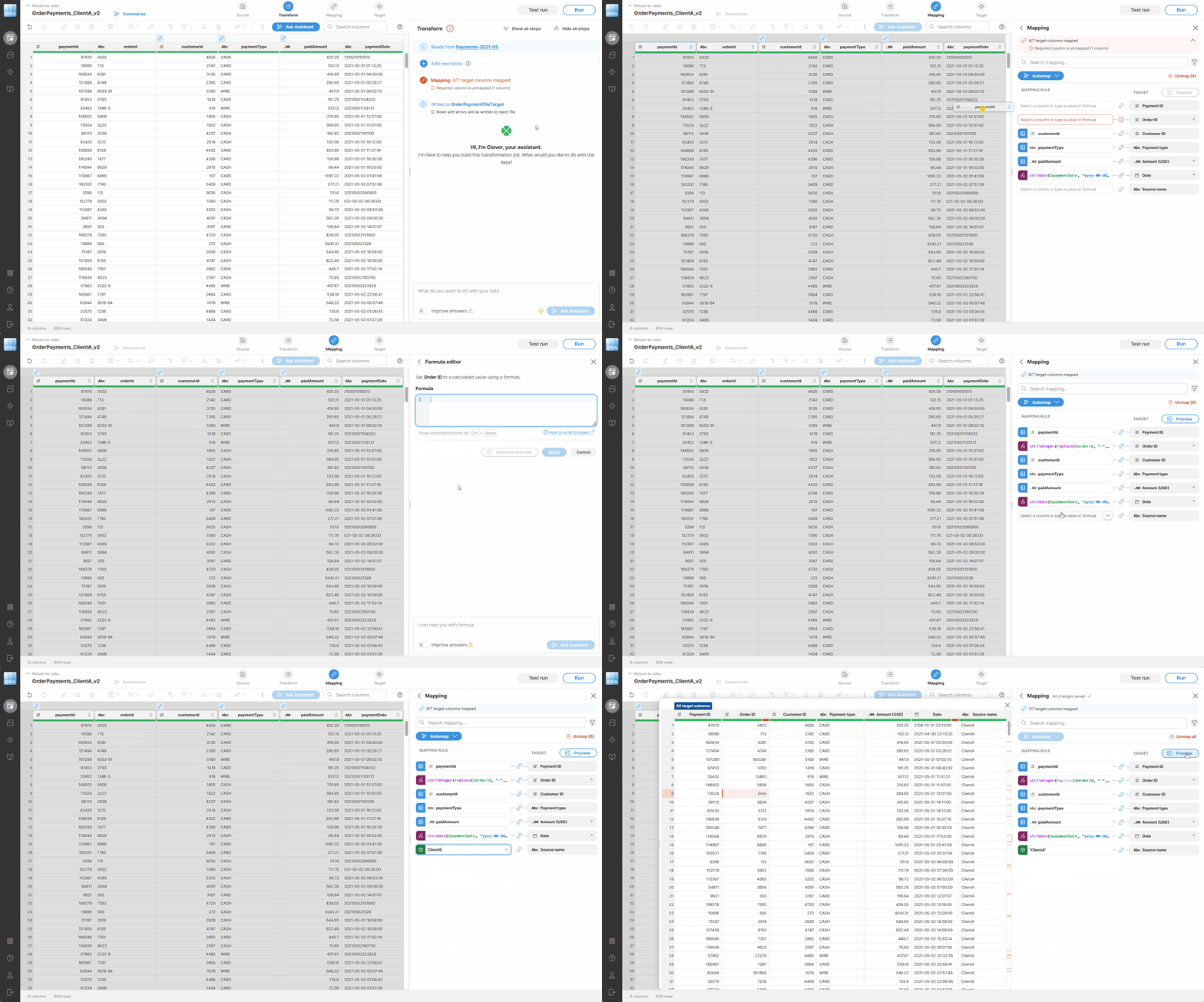
At the same time, we’ve reworked the mapping editor user interface to be more comfortable. It is now easier to map columns and use constants. You can even mark column as Not mapped to signify that it has not been forgotten and should remain empty.
Dynamic Preview in Wrangler
Data preview in Wrangler allows you to see exactly what your data looks like as you are building your transformation. We’ve added new kind of preview – a dynamic preview that can show you the results of your step as you are working on it before the step is added to your transformation.
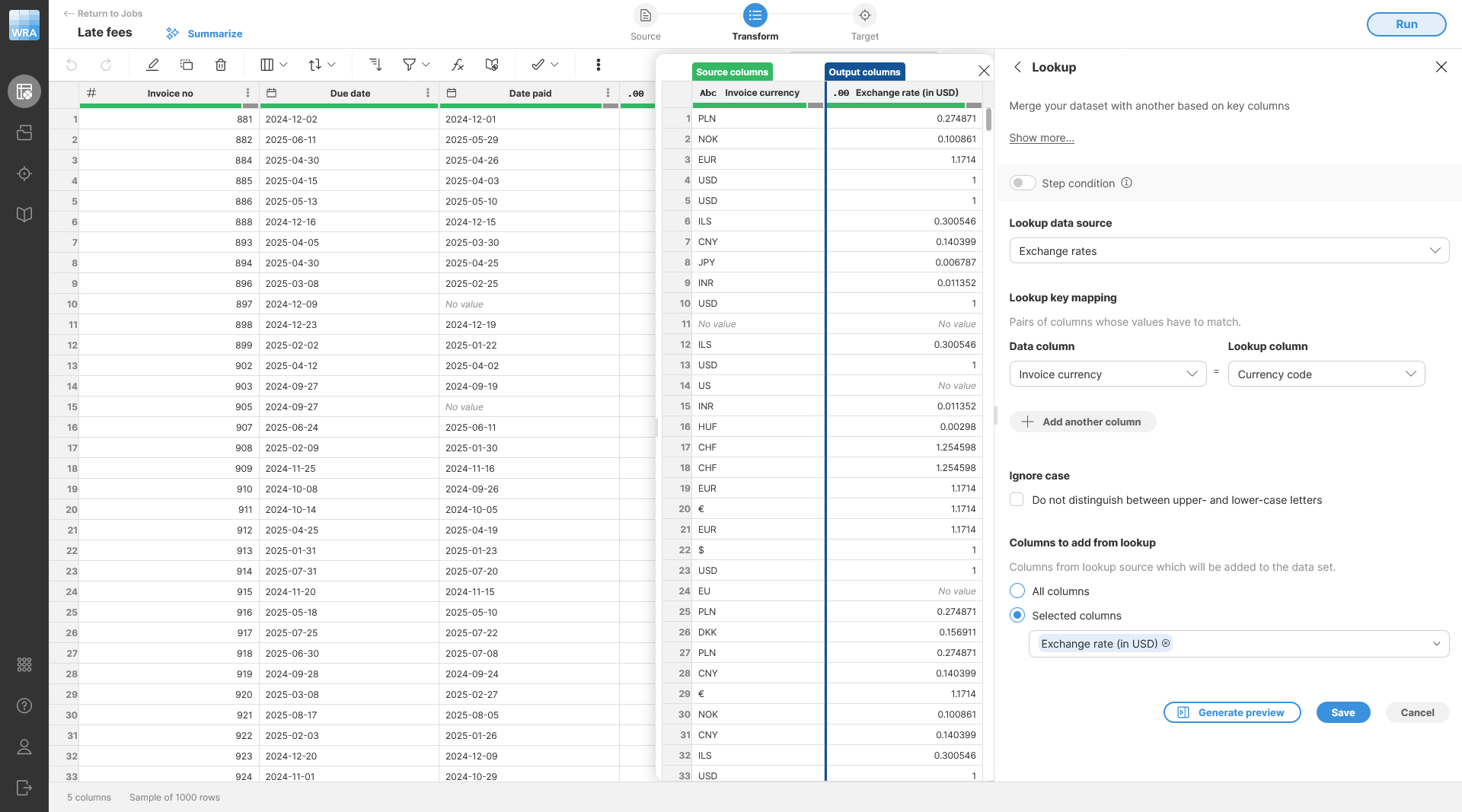
Dynamic preview will show you input as well as output columns of your step together so you can focus on data being impacted by the step instead of having to scroll through your data set to find columns you are working with.
This works very well, especially with formulas where you can easily see which columns are used in the formula and what the formula result is.
Dynamic previews are also available in target mapping editor helping you see your job output right away.
Clover Assistant in Wrangler
Clover Assistant is an AI-powered tool that helps you create your jobs – simply write what you are looking for, and the Assistant will suggest transformation steps to implement your requirements.
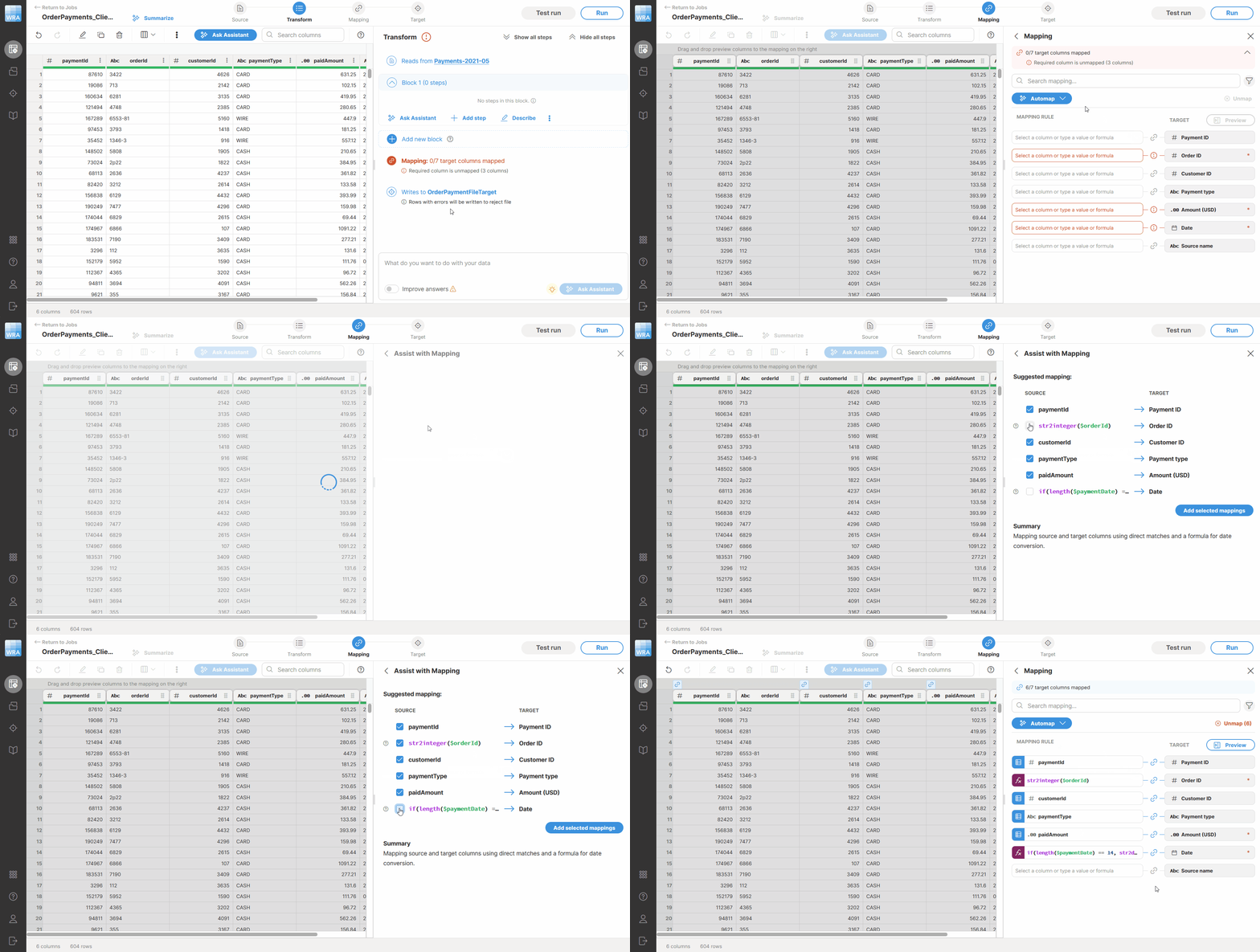
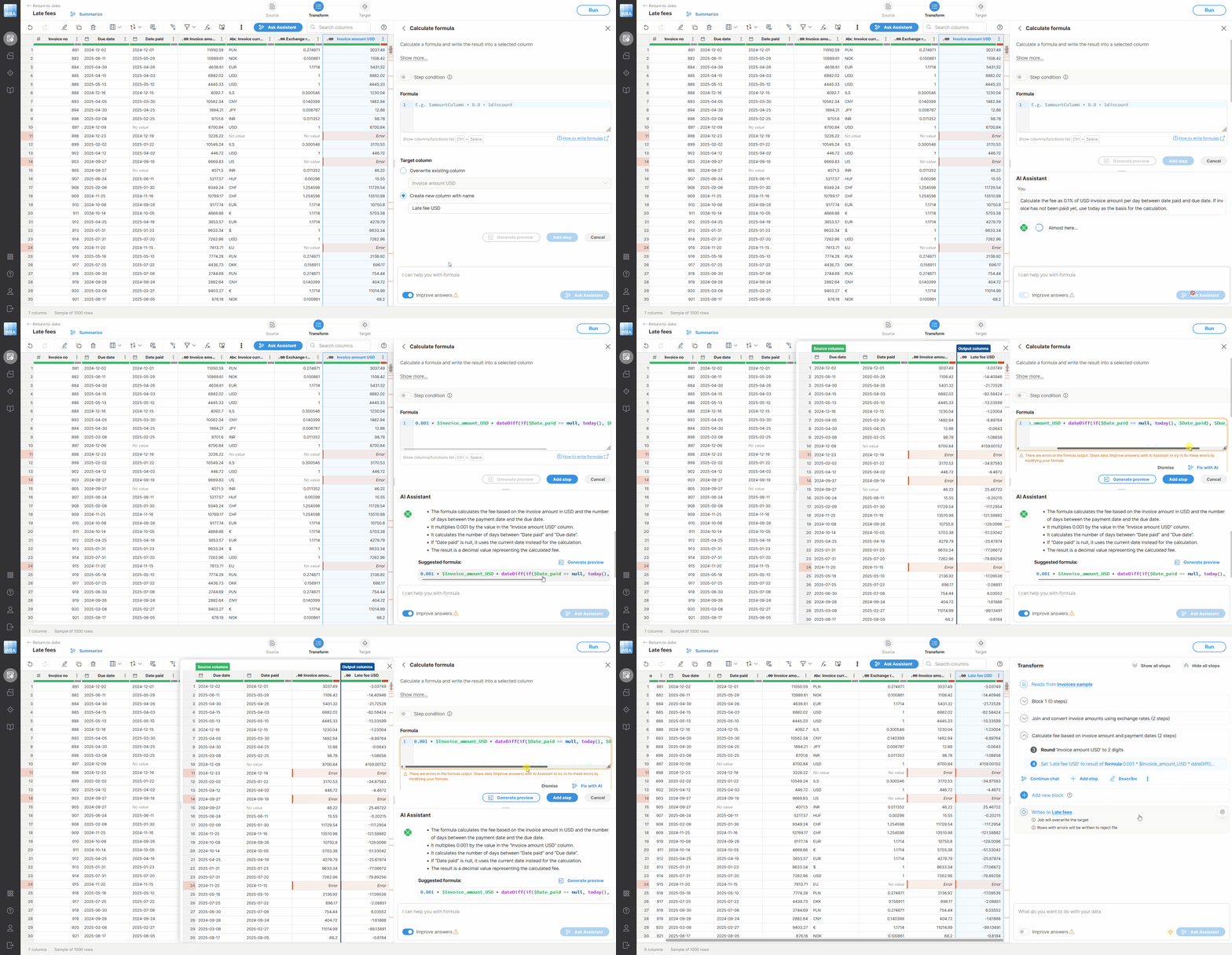
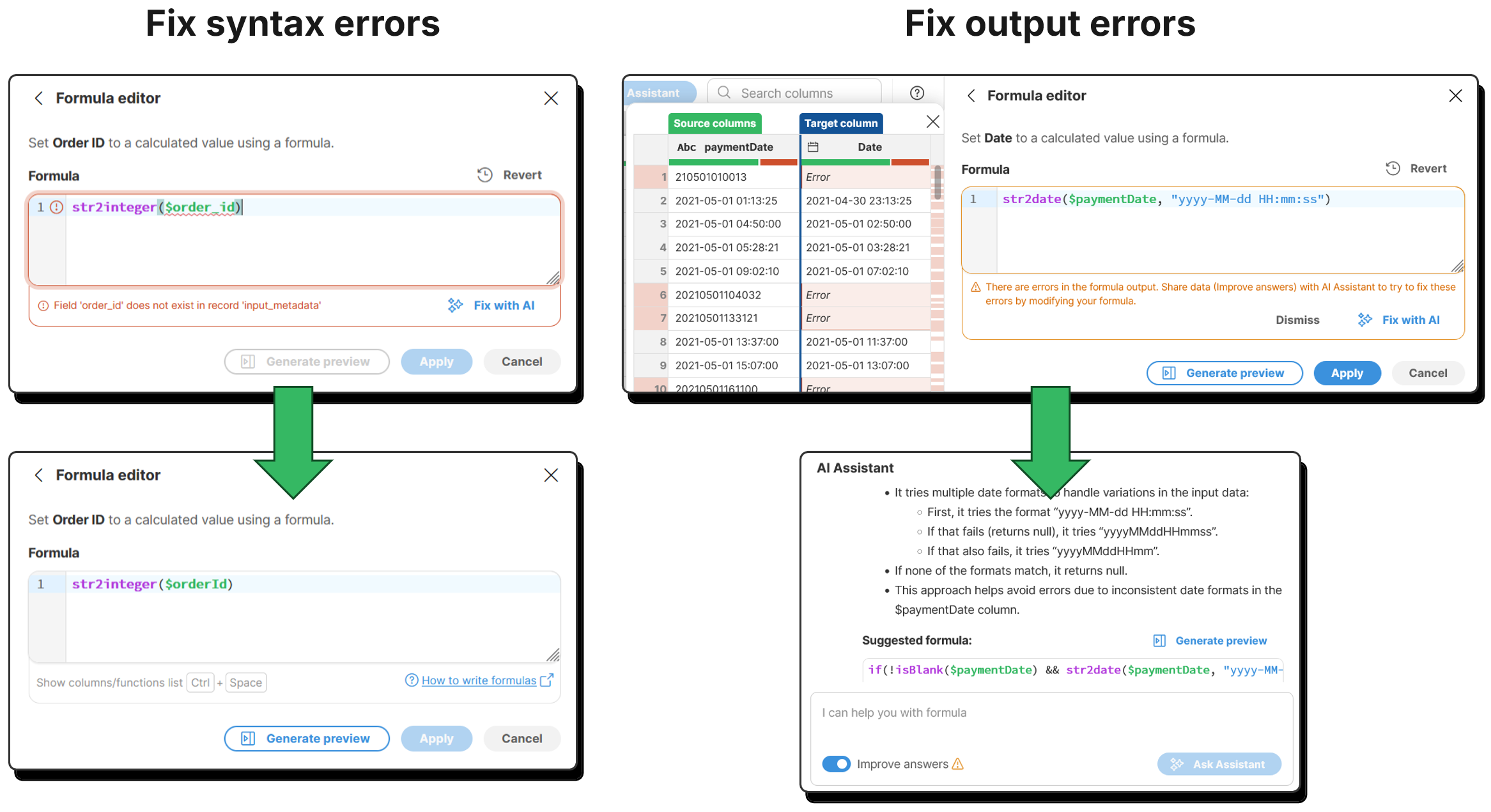
In this release we’ve improved the Assistant to understand formulas and new mapping with formulas. It will now be able to generate more complex formulas (including formulas in mapping) but also help you fix syntax errors or even logical errors in your formulas.
Wrangler Jobs as Subgraphs via WranglerJob Component
A common use case for Wrangler is data ingestion where the mapping between potentially many sources and known target layout is implemented in Wrangler by domain experts. This approach allows each team to focus on what they know best – domain experts on data mapping while data engineering team focuses on automation and orchestration.
This kind of use case will now be much easier to implement since WranglerJob component allows you to run Wrangler jobs as subgraphs directly as part of your graphs. You will not need job exports and their conversions to subgraphs – you can now select job to run, and the component will take of the rest.
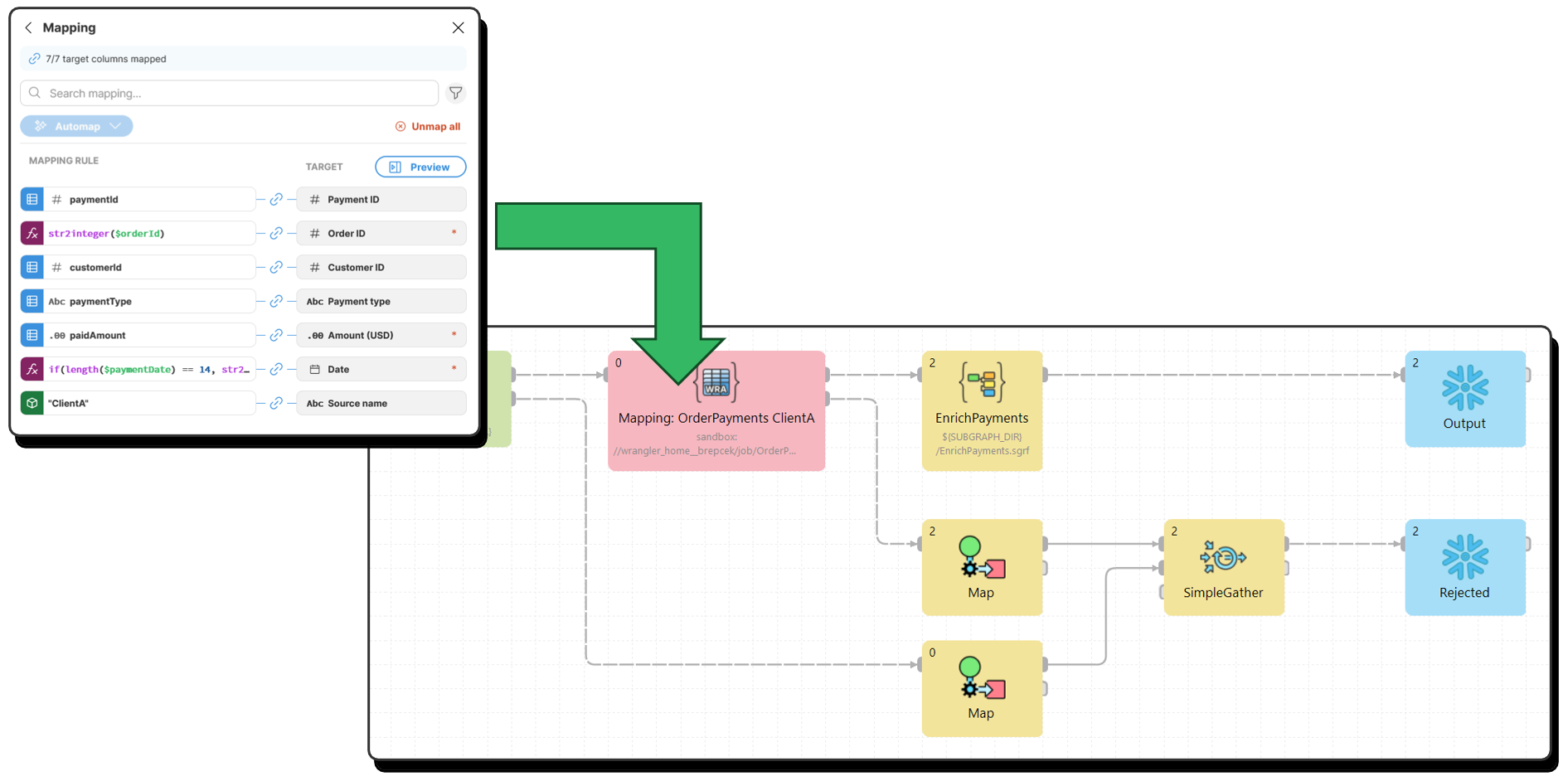
At the same time, the Wrangler job component will allow you to change settings of your jobs (e.g., data source parameters) or even completely bypass source or target configured in your job for more control in your graph.
Data Manager Improvements
The ability to connect Data Apps to your data sets in Data Manager as described above is the biggest improvement to Data Manager in this release. However, we’ve also implemented many other Data Manager improvements which provide additional user comfort and better user experience as well as additional control over what user can do with data.
New Data Set Permissions
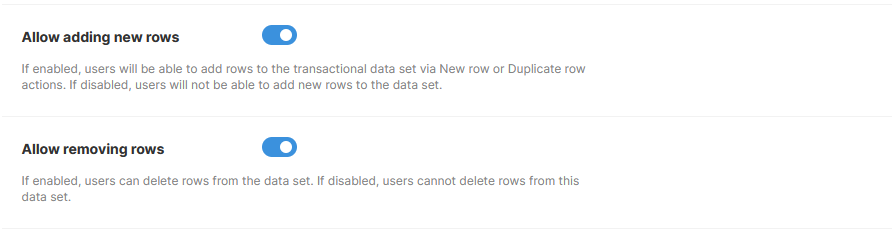
You can now control whether rows can be deleted or inserted in each data set. This allows you to more precisely control what actions your users can take since there are various use cases in which adding or deleting rows may not be allowed.
These permissions are independent of each other and apply to the whole data set for all users regardless of their role.
User Experience Improvements
User experience improvements include better editor for long (even multi-line) values in your data sets, better settings screen, improved column chooser, new context menu and more.
Platform Updates
We’ve expanded the list of deployment stacks supported by CloverDX Server to include Microsoft Windows Server 2025 Standard. Currently supported configurations are therefore the following three stacks and their variations:
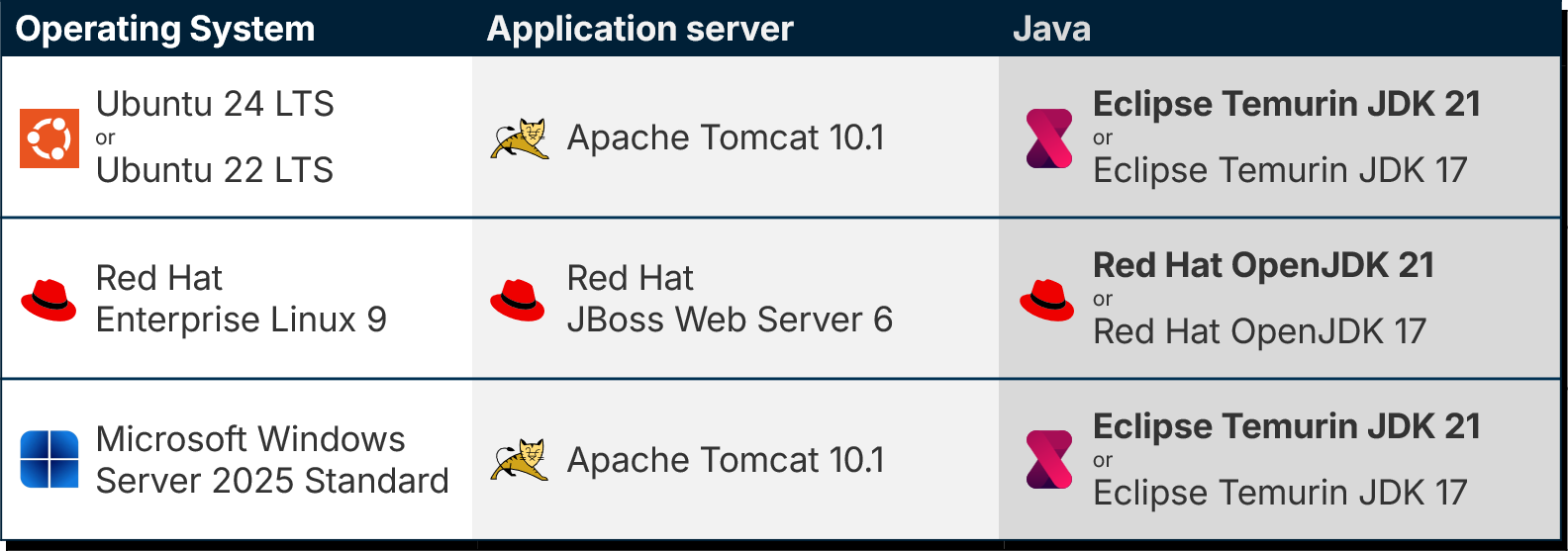
The above can be combined with various databases to store the Server configuration database. See more details in our online documentation.
We’ve also updated CloverDX Designer which now requires Java 21 (Eclipse platform no longer supports Java 17). Note that you can still run your Server on Java 17 and Designer on Java 21, just make sure to set Designer’s Java compatibility to 17 to ensure that any Java classes that you may have in your solution are compiled with the correct Java version.
Other Improvements
Additional output ports on Merge and Concatenate components
Merge and Concatenate now allow any number of output ports that will receive a copy of the component’s output. This matches other similar components like SimpleGather or others and allows you to simplify your graph layouts avoiding SimpleCopy components in some cases.
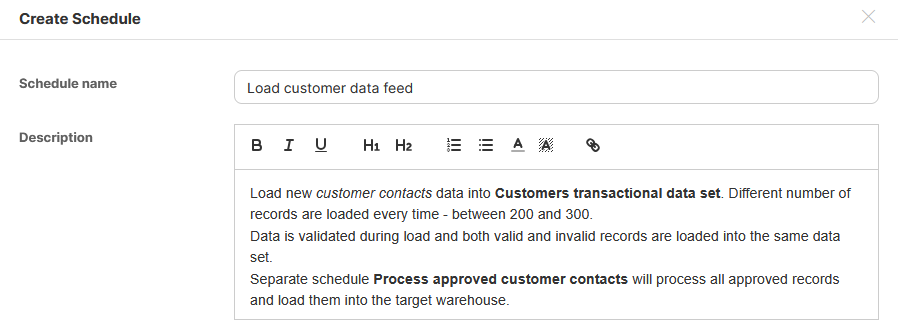
Formatted description in schedules and event listeners
Event listeners and schedules can now have descriptions with formatting. This can help you highlight important pieces of information in description for your schedules or event listeners.
Better handling of rate limits for Data Services
Data Services that have rate limits will now return HTTP 429 (Too Many Requests) error code when called too many times. This will allow callers to adjust their rate of calls to not overload the Server. Additionally, new headers X-Clover-Status-Message, RateLimit-Limit, and RateLimit-Remaining are set to allow the caller to better react and adjust its behavior.
To help you install or upgrade to this version, we've prepared a simple checklist:
Before you upgrade
- Be sure to check the "Compatibility" notes for ALL intermediary releases. We mark all changes that can potentially alter the function of your existing transformations with a "Compatibility" label. Typically, you can safely ignore most of them, as we try hard to keep as much backwards compatibility as possible. There's a comprehensive list of all releases that will help you get the information quickly.
- Upgrade Designer and Server together. We always release Designer and Server together under a single version. It's highly recommended to upgrade Server and all Designers at the same time. Although using different versions of Designer to connect to Server might work, it is not generally supported.
- There are no incremental patches. We don't release incremental patches. Every upgrade is in fact a full installation that, if installed over the older version, will automatically update whatever is necessary in your workspaces, sandboxes, and Server databases as needed, no user data will get overwritten.
- Don't forget to backup. Although none of the above upgrade steps requires explicit backup, we recommend you always back up your work. The upgrade will keep all your transformations, jobflows, and configurations safe. However, as a good word of advice, it never hurts to have a backup.
Designer upgrade
- Download the latest version by logging into your customer account. If you lost your credentials or no longer have access there, click here to recover your password or contact our CloverCARE Support.
- Install the new version of Designer. You can install Designer over your existing installation. The process will automatically clean up the old version. Don't worry, you will NOT lose your workspaces, graphs, and transformations. However, if you installed some additional plugins to Designer (Eclipse plugins) you might need to reinstall them. Eclipse should automatically help you do that. When you start the application, point it to your existing workspace directory. With some major releases, we may notify you about upgrading the workspace to the latest version. In such cases, you won't be able to use the workspace with previous versions—be sure to upgrade ALL Designers at once if you're sharing the workspace.
- Activate the product on first start. You will need a new key as we issue new license keys for every new major version (e.g. from 4.9 to 5.0). If you're on our maintenance program, we automatically renew the keys for you. Just go to the License Keys again and copy/paste the license keys from there. If you can't find the latest keys, please contact us to renew your product maintenance.
Server upgrade:
- Download the latest version by logging into your customer account. You'll find Server in the same list as Designer downloads. If you no longer have access there, click here to recover your password or contact our CloverCARE Support.
- Plan for downtime. Upgrading Server requires downtime, so plan your upgrades in advance. If you're running multiple environments, upgrade the non-production installation first and run all your tests there first.
- Follow our step-by-step Server Upgrade Guide. We've prepared detailed instructions on how to properly shut down Server and install a new one. Server will upgrade its database and sandboxes from any previous version automatically.
- Activate the product on the login screen of Server Console. Server requires new license keys with every minor version (e.g. from 4.9 to 5.0) and we automatically renew the keys for you. Just go to the License Keys again and copy/paste the license key from there.
Please consult our Upgrading to CloverDX Server 7.0 article for additional details with more detailed overview of how to upgrade from Apache Tomcat 9 to Apache Tomcat 10.1.
| Release | Compatibility/Upgrade notes, Features & Fixes | Published | Download | ||||||||||||||||||||||||||||||||||||||||||||||||||||||||||||||||||||||||||||||||||||||||||||||||||||||||||||||||||||||||||||||||||||||||||||||||||||||||||||||||||||||||||||||||||||||
|---|---|---|---|---|---|---|---|---|---|---|---|---|---|---|---|---|---|---|---|---|---|---|---|---|---|---|---|---|---|---|---|---|---|---|---|---|---|---|---|---|---|---|---|---|---|---|---|---|---|---|---|---|---|---|---|---|---|---|---|---|---|---|---|---|---|---|---|---|---|---|---|---|---|---|---|---|---|---|---|---|---|---|---|---|---|---|---|---|---|---|---|---|---|---|---|---|---|---|---|---|---|---|---|---|---|---|---|---|---|---|---|---|---|---|---|---|---|---|---|---|---|---|---|---|---|---|---|---|---|---|---|---|---|---|---|---|---|---|---|---|---|---|---|---|---|---|---|---|---|---|---|---|---|---|---|---|---|---|---|---|---|---|---|---|---|---|---|---|---|---|---|---|---|---|---|---|---|---|---|---|---|---|---|---|---|
Wrangler Mapping
Wrangler AI Assistant for Formulas
Dynamic Step Preview in Wrangler
WranglerJob Component
Connected Data Apps in Data Manager
Miscellaneous
Fixes
Security
Platform Updates
Compatibility
|
April 07, 2026 | Documentation Download CloverDX 7.4 7.4.0 | |||||||||||||||||||||||||||||||||||||||||||||||||||||||||||||||||||||||||||||||||||||||||||||||||||||||||||||||||||||||||||||||||||||||||||||||||||||||||||||||||||||||||||||||||||||||
- For Developers (Improvements most useful for developers bringing new functionality or optimizations in data transformation and orchestration)
- For Administrators (Improvements or features that will help setup, install, administer and manage the platform)
- For Support (Helps staff supporting the production environment to identify and escalate potential problems or avoid such)
- For Security (Improvements and changes relevant to security focused staff – sys admins and developers alike)