
Releases
CloverDX 7.5 is a major step in expanding AI across the whole platform. We are introducing CloverDX AI Assistant in Designer – an end-to-end AI assistant for job authoring and collaboration.
It can work on tasks such as job design, updates, troubleshooting, or documentation; but you can also provide detailed specifications and let it propose the architecture, plan the implementation and then build a complete solution for you.
The Assistant uses a BYOK (Bring Your Own Key) approach, so you stay in control of its LLM usage and costs.
It ships as Technology Preview and should only be deployed in test environment rather than in production.
The CloverDX MCP Server has been expanded from read-only support tools to cover more than 50 tools aimed at engineers and job developers. These new tools let AI agents author, review, test, and troubleshoot CloverDX jobs. You can work on your solutions from any agentic IDE such as Claude Code, OpenAI Codex, Google Antigravity, or others.
Our new Data Manager Customization framework and AI skills can help you build your own extensions on top of Data Manager quickly and effectively using AI. Data Manager also gets the ability to categorize your data sets using user-defined categories for improved governance, improved lookup configuration and significant performance improvements for large lookups.
You can now customize size of data preview in Wrangler to help you during job development, and we’ve also improved the dynamic step preview to show you rows that would be removed by filtering steps. Wrangler Assistant also gets a boost by being able to use newer models such as GPT 5 and additional connectivity options to allow you to fit into your organizational policies.
Data Apps received several updates as well – for example, the ability to notify Data Manager that a data set has been modified as part of the app execution or the ability to run apps without parameters right away without extra screens.
In preparation for Salesforce shutting down username and password authentication for their APIs, our Salesforce components can use OAuth2 to authenticate. This will allow your solutions to switch well before Salesforce turns off legacy access in their Summer 2027 release.
There are of course many other improvements across the board – usability, performance and security improvements in all parts of CloverDX platform. For additional details please review the full list of changes at the bottom of the release notes.
New features in 7.5
AI Assistant in Designer
In this release we are significantly expanding AI capabilities within CloverDX by adding CloverDX AI Assistant to Designer. Designer’s Assistant lets you use AI directly from the Designer to work on your projects as an end-to-end solution for job authoring and collaboration.
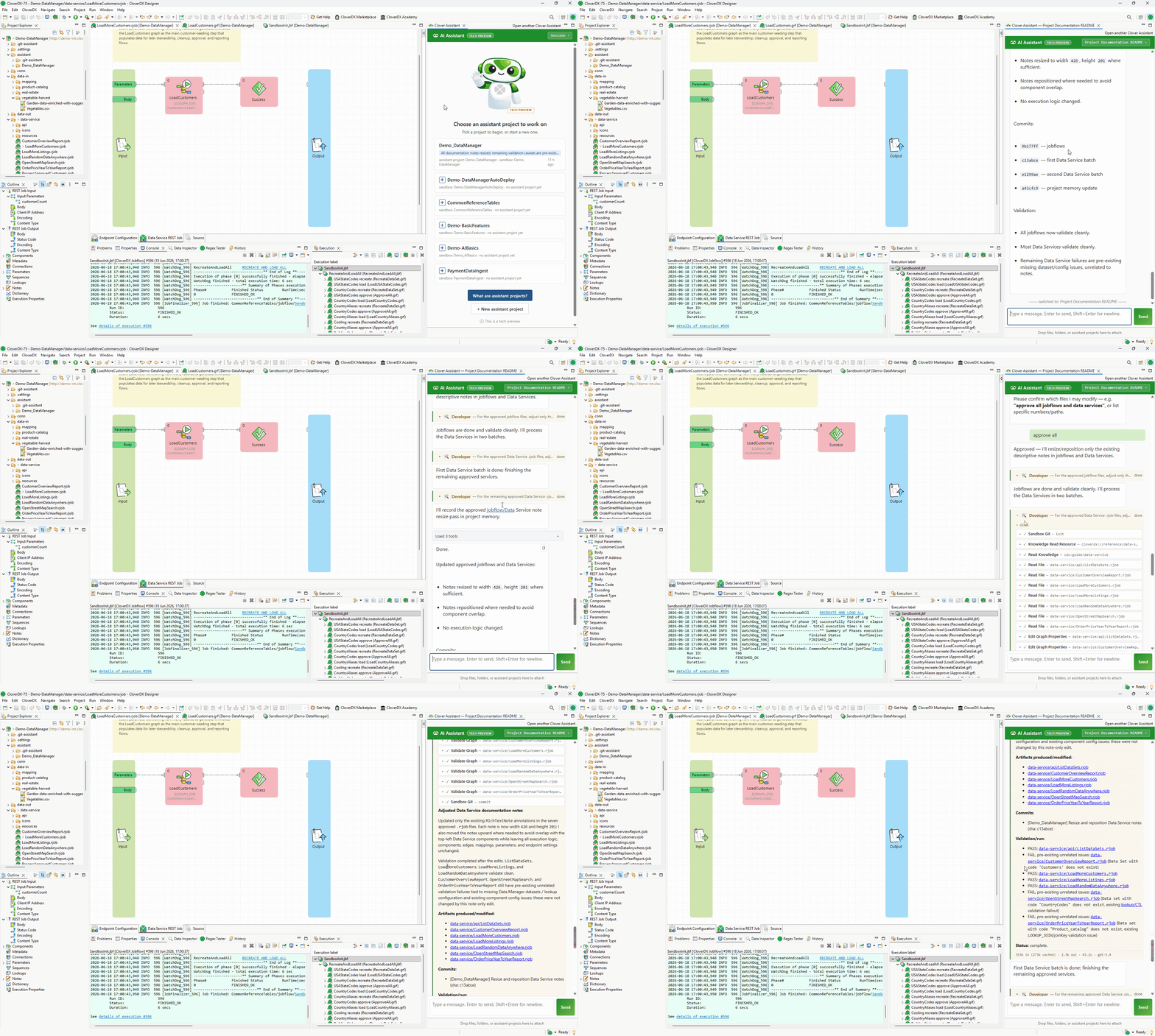
The Assistant can help you create new jobs, modify existing ones, write documentation, investigate job execution issues and more. It can work with complex specifications even building complete solutions for you, not just single job – just provide a detailed specification document and it will propose the architecture, plan development sprints and then execute the plan to build what you need.
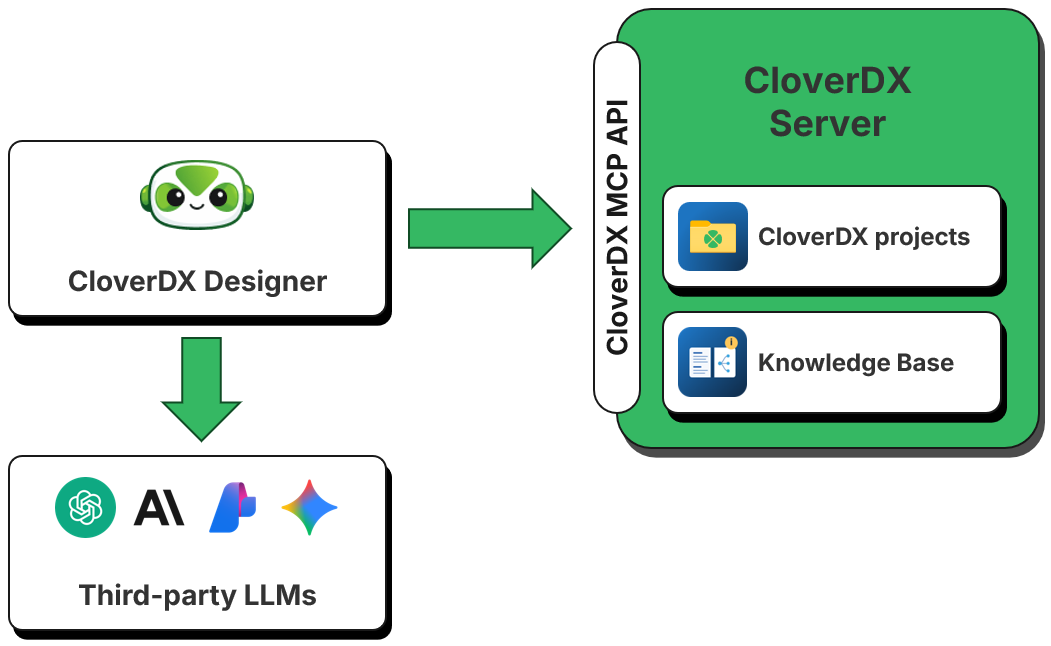
The Assistant requires access to Large Language Model (LLM) and uses a Bring Your Own Key approach. By providing your own API key you stay in full control of the Assistant.
In CloverDX 7.5, we are releasing the Assistant as a technology preview. We recommend only deploying it in test environments rather than in production.
CloverDX MCP Server
The Model Context Protocol (MCP) allows AI agents to communicate with CloverDX Server. MCP has been available since CloverDX 7.3, where the original set of tools aimed at support and operations teams helping them monitor CloverDX Server, analyze logs, diagnose various issues and so on. These tools were all read-only and could not modify state of the CloverDX Server.
With CloverDX 7.5 we are adding almost fifty new tools to CloverDX MCP Server. These new tools are aimed at data engineers who use AI agents to author, review, test, and troubleshoot their CloverDX jobs.
As a result, you can now use CloverDX Server with any agentic IDE – such as Claude Code, OpenAI Codex, Google’s Antigravity and more – to work on your CloverDX solutions.
Data Manager Customization
CloverDX has always given engineers the ability to tailor the platform to their needs – from branding and JavaScript injection to Data Apps to parameterizing virtually any aspect of a job.
In CloverDX 7.5 we are continuing this tradition by adding a modern twist to it – we are now providing a public SDK and a set of skills for coding AI agents that let you build Data Manager UI customizations much faster.
Data Manager now supports a customization framework that works just like the one for Data Apps. At the same time, its internal APIs and structure have been updated to make it more suitable for customization. We are also providing a set of AI skills to provide agentic IDEs with tools to understand how to use this customization framework and how to create Data Manager extensions.
Together, these let you use AI to design, build and deploy your own Data Manager customizations to shape the platform to fit your data flows and processes.
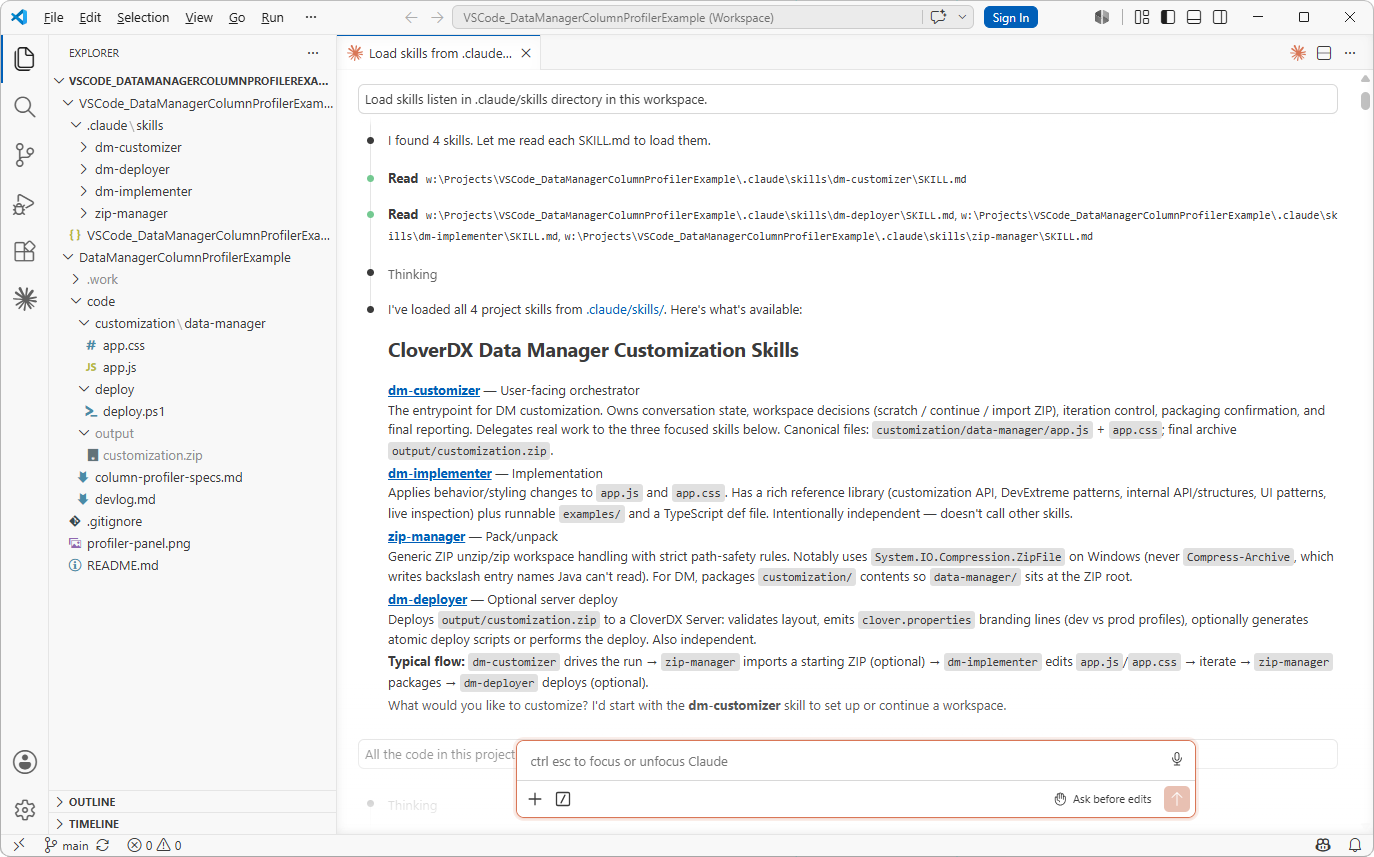
The skills are available in our GitHub repository https://github.com/cloverdx/cloverdx-datamanager-skills. Load them into your agentic platform of choice and start creating new Data Manager extensions in minutes.
Data Manager Improvements
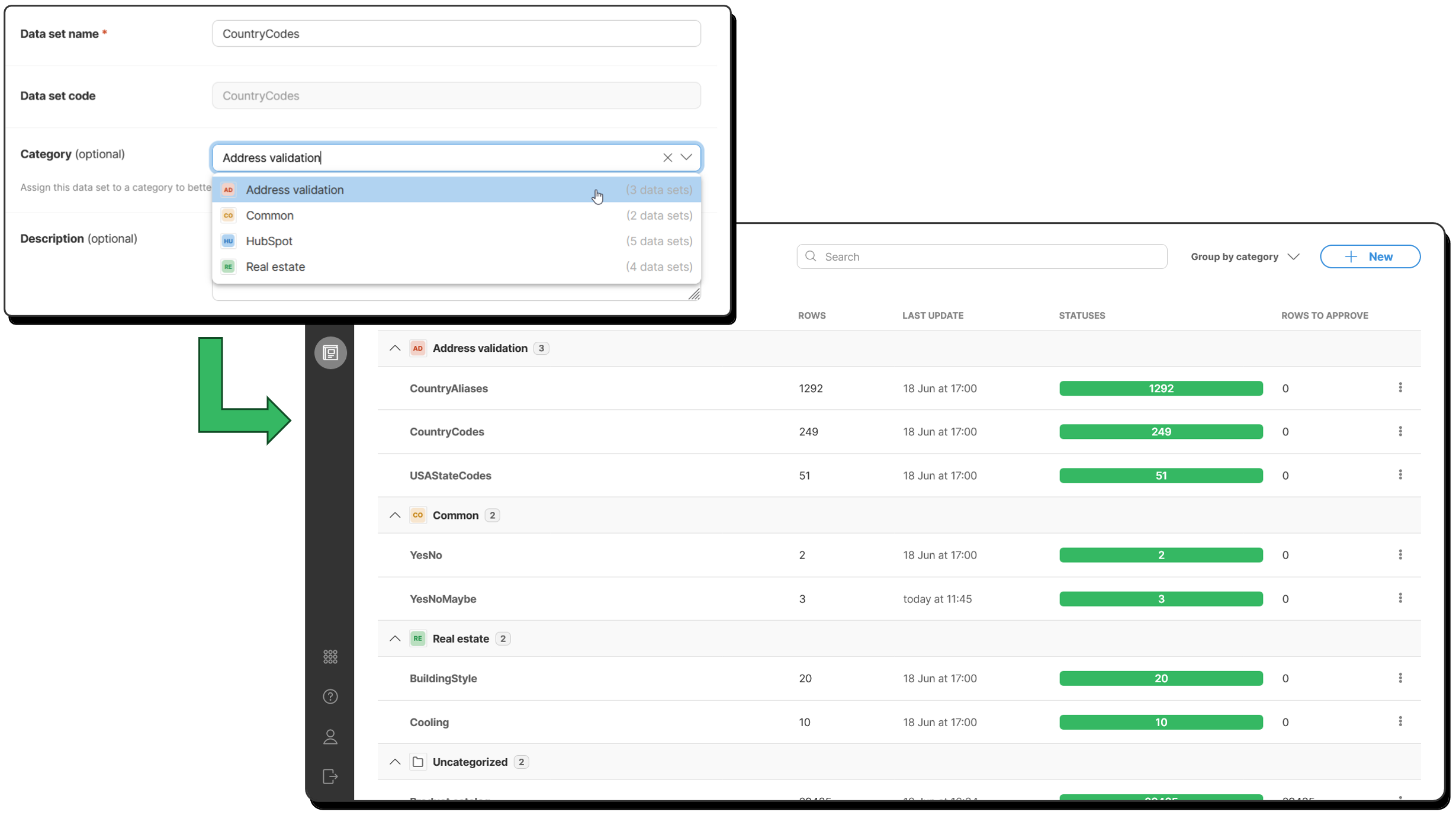
In this release we’re adding categories to Data Manager. You can now configure a custom category for each data set so that related data sets are grouped together. This will help you organize your data better and help Data Manager users quickly find the data set they need to work with.
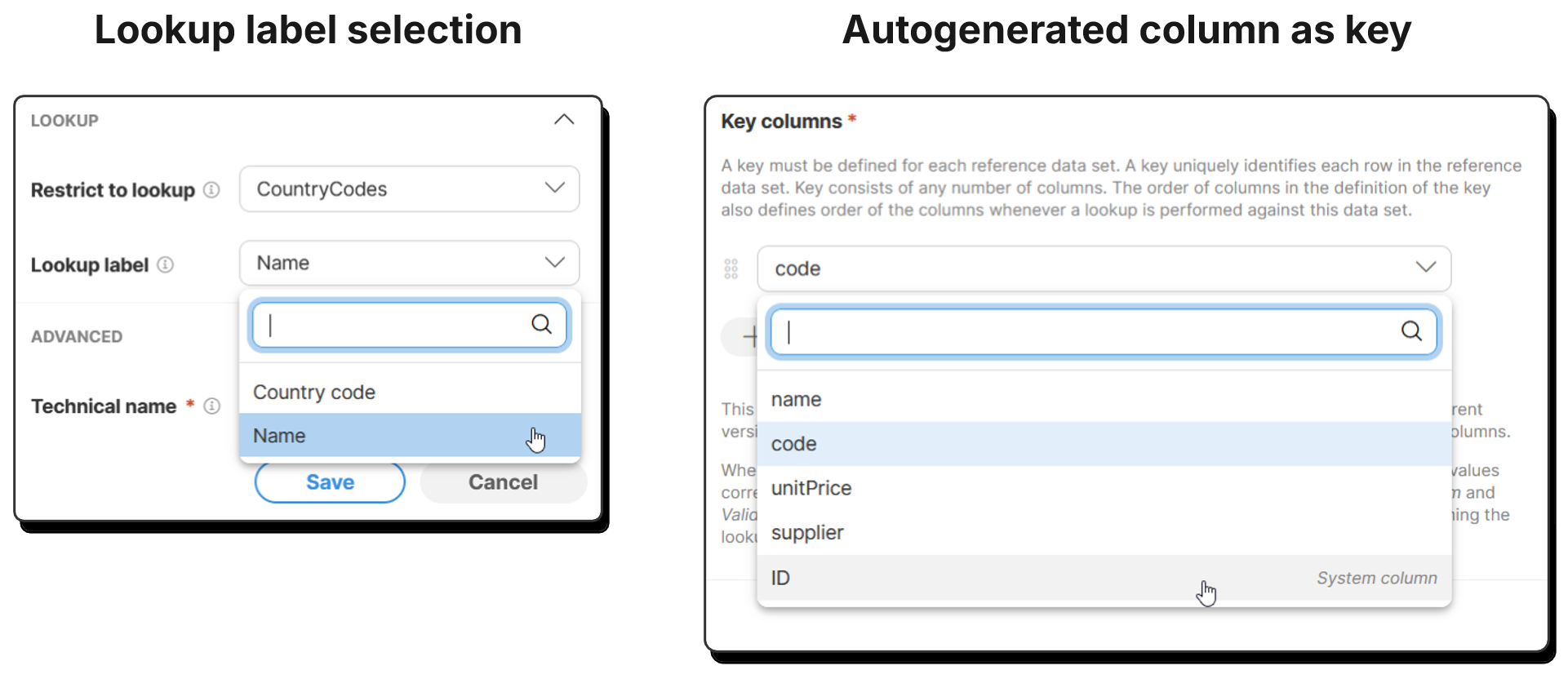
You can now configure a custom label column for your reference data sets instead of relying on hard-coded label column. You can also use auto-generated column as the data set key. These changes will help you with data governance since they will allow clearer column naming and simpler data sets which can avoid extra columns in some cases.
We’ve also improved the way you can configure data set permissions – you can now use groups instead of listing users one by one. This will simplify your permission management, especially if you are managing larger organization with many users. You can delegate group management to Server administrator who can tie groups to Active Directory to mirror your organization’s structure as needed.
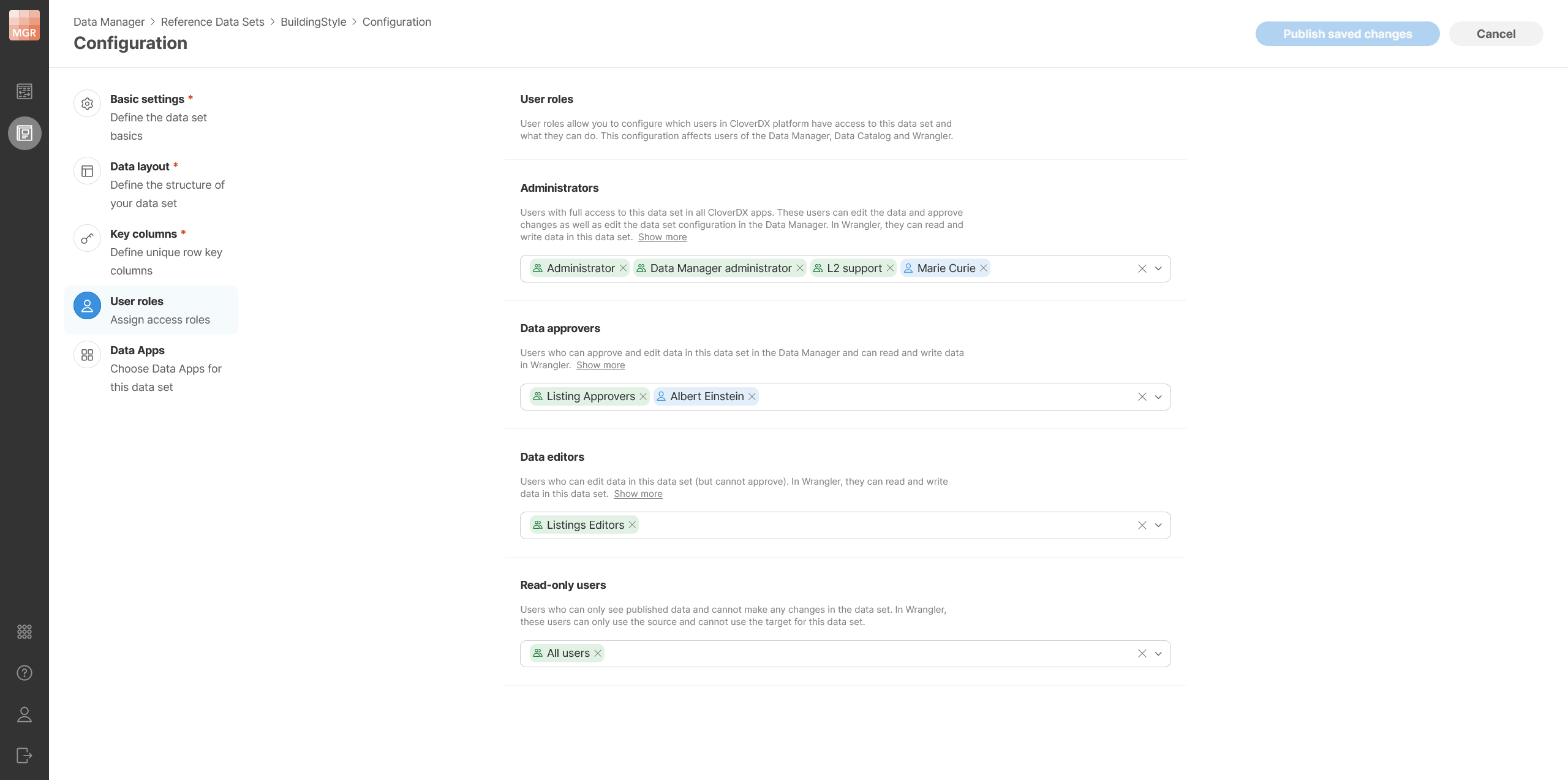
As always, there are also many other improvements that will make your overall experience with Data Manager much smoother – major performance improvements for data sets with large lookups, more powerful row selection, improved editor for long values, better bulk action behavior, improved data set configuration, and more.
Wrangler Improvements
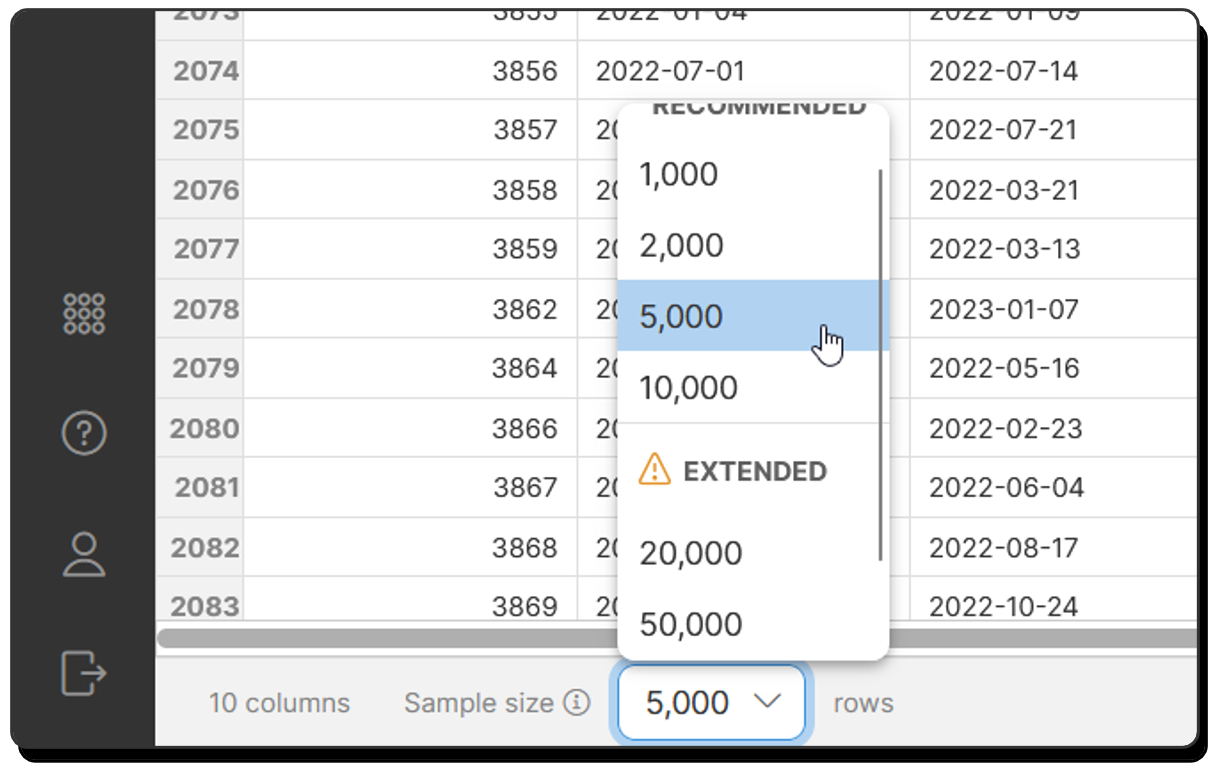
In this release we are adding the ability to change the number of rows in data sample Wrangler uses during job development (job execution always processes all rows). In previous versions, Wrangler always used 1000 rows when sampling your data. Now you can configure larger samples which will help you see more of your data as you are working on your job.
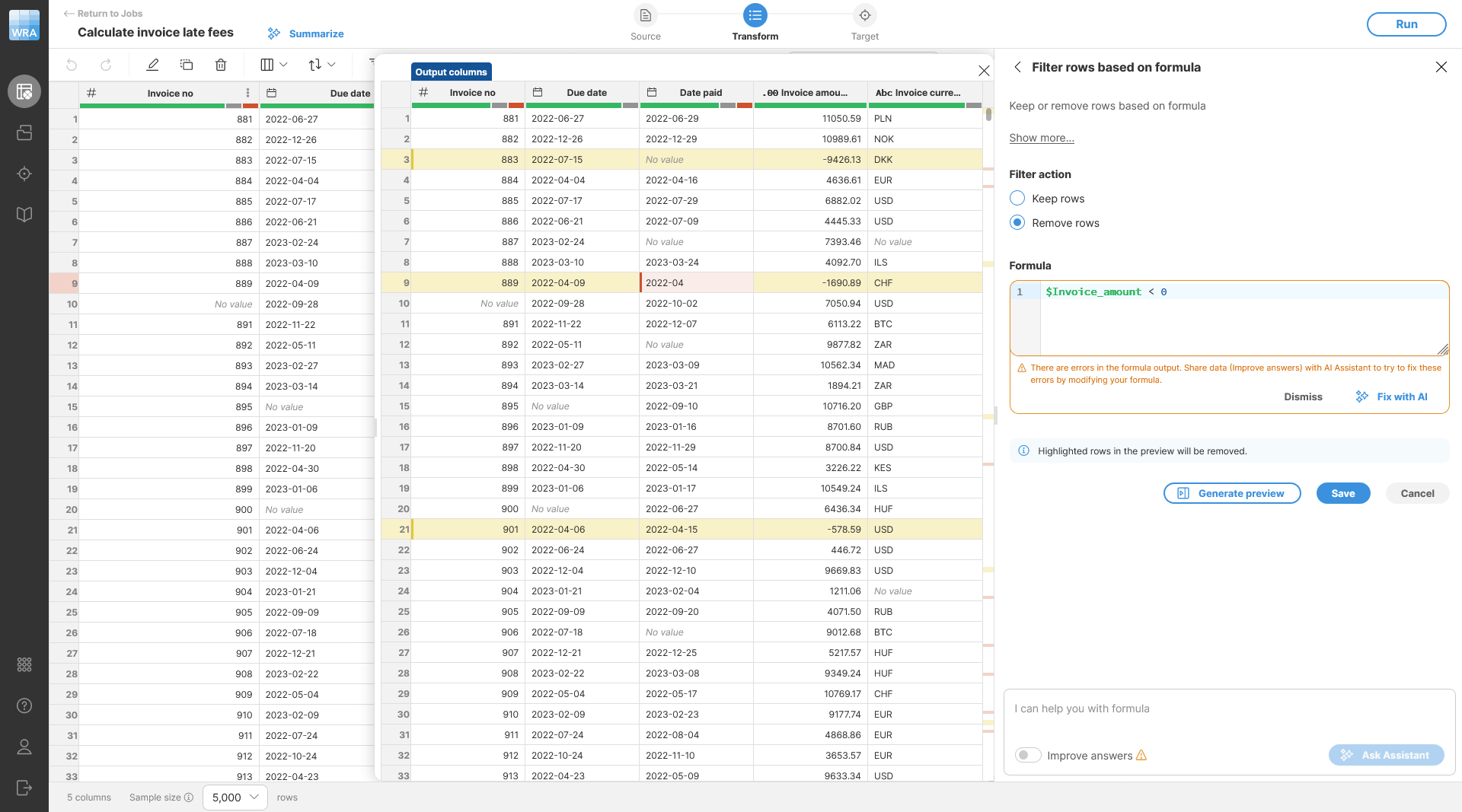
Dynamic data previews are also getting an upgrade. The preview will now show which rows will be removed from your data set by steps that filter your data – e.g., Filter rows based on formula or similar.
Wrangler Assistant now supports additional connectivity options – it can connect with LLMs via Azure API Management (“AI Gateway”).
We are also extending permissions of the shared sandbox in Wrangler. It can now use the same approach as data sets in Data Manager where groups as well as single users can be configured for different roles simplifying permissions management in larger organizations.
Data App Improvements
Data Apps can now signalize to Data Manager that a data set should be refreshed. If you have such data set open, you’ll get a notification when the app ends and you’ll be able to refresh your data without forcing full page reload.
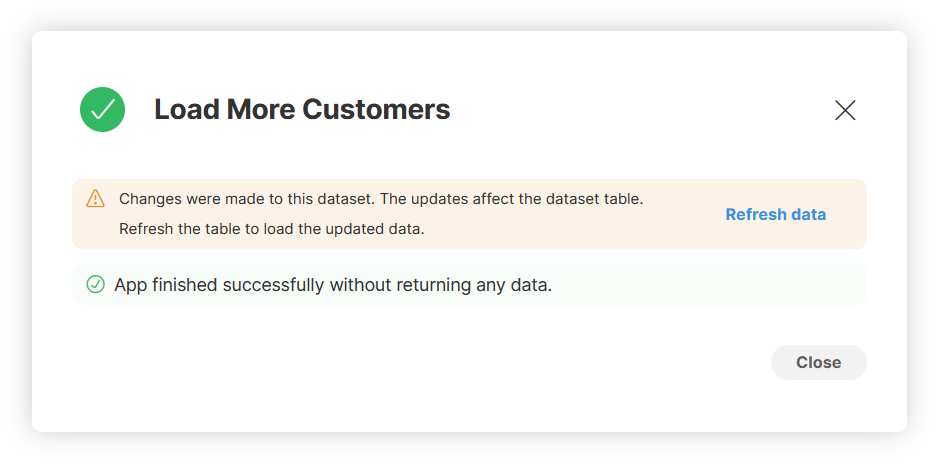
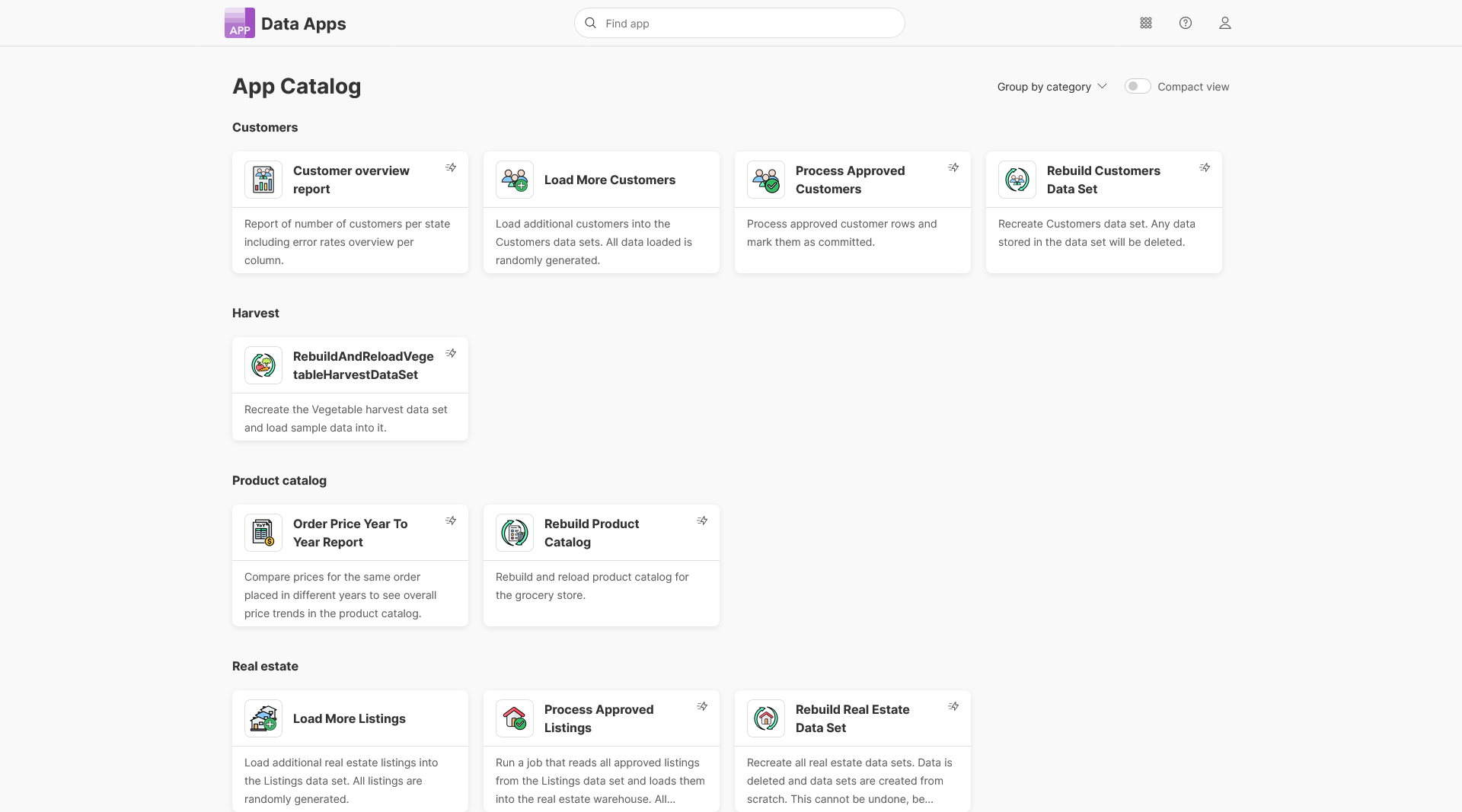
Data Apps without parameters will now run immediately without showing the info screen with button to run the app. This will streamline app usage especially when they are connected to Data Manager’s data sets and shown in the toolbar. Apps which behave like this have a flash icon on the toolbar or in the App Catalog.
Data App developers will now have even more control over when the Download button is shown when app results are shown to the user. This will allow them to hide the download section of the UI for nicer experience especially for apps that return simple results that are shown in a table.
Other
Salesforce components via OAuth2
We’re extending all Salesforce components in CloverDX to allow you to authenticate with OAuth2 by adding Salesforce provider to OAuth2 connection settings and allowing you to use such connections to authenticate Salesforce components in your jobs. This is all in preparation for Salesforce planning to remove ability to authenticate with username and password in their Summer 2027 release. Making this change now will give you enough time to migrate your project and ensure that everything works as expected.
CopyFiles and MoveFiles timestamp handling
We are unifying the behavior of CopyFiles and MoveFiles components with regards to handling of modified timestamps for files that are being copied or moved. Both components gain a new attribute that allows you to control their behavior to ensure consistent behavior across many file systems.
S3 protocol update
We’ve reimplemented S3 protocol handling to use newer AWS SDK for better integration with AWS services and for greater security. The new implementation behaves just like the old one and you should not notice any differences. You can still use the old implementation via s3-legacy protocol which will be removed in a future release.
New CTL functions
You can now use a set of new CTL functions in your jobs:
- decode as a sort of mini-lookup to select an item from a set specified via parameters.
- escapeJson and unescapeJson to help you handle strings in JSON-safe ways.
- getRequestCertificateProperties to query properties of a certificate passed to a data service for advanced behavior control based on caller.
- addDataSetReloadNotification to let Data Manager know which data sets have been modified during Data App execution.
To help you install or upgrade to this version, we've prepared a simple checklist:
Before you upgrade
- Be sure to check the "Compatibility" notes for ALL intermediary releases. We mark all changes that can potentially alter the function of your existing transformations with a "Compatibility" label. Typically, you can safely ignore most of them, as we try hard to keep as much backwards compatibility as possible. There's a comprehensive list of all releases that will help you get the information quickly.
- Upgrade Designer and Server together. We always release Designer and Server together under a single version. It's highly recommended to upgrade Server and all Designers at the same time. Although using different versions of Designer to connect to Server might work, it is not generally supported.
- There are no incremental patches. We don't release incremental patches. Every upgrade is in fact a full installation that, if installed over the older version, will automatically update whatever is necessary in your workspaces, sandboxes, and Server databases as needed, no user data will get overwritten.
- Don't forget to backup. Although none of the above upgrade steps requires explicit backup, we recommend you always back up your work. The upgrade will keep all your transformations, jobflows, and configurations safe. However, as a good word of advice, it never hurts to have a backup.
Designer upgrade
- Download the latest version by logging into your customer account. If you lost your credentials or no longer have access there, click here to recover your password or contact our CloverCARE Support.
- Install the new version of Designer. You can install Designer over your existing installation. The process will automatically clean up the old version. Don't worry, you will NOT lose your workspaces, graphs, and transformations. However, if you installed some additional plugins to Designer (Eclipse plugins) you might need to reinstall them. Eclipse should automatically help you do that. When you start the application, point it to your existing workspace directory. With some major releases, we may notify you about upgrading the workspace to the latest version. In such cases, you won't be able to use the workspace with previous versions—be sure to upgrade ALL Designers at once if you're sharing the workspace.
- Activate the product on first start. You will need a new key as we issue new license keys for every new major version (e.g. from 4.9 to 5.0). If you're on our maintenance program, we automatically renew the keys for you. Just go to the License Keys again and copy/paste the license keys from there. If you can't find the latest keys, please contact us to renew your product maintenance.
Server upgrade:
- Download the latest version by logging into your customer account. You'll find Server in the same list as Designer downloads. If you no longer have access there, click here to recover your password or contact our CloverCARE Support.
- Plan for downtime. Upgrading Server requires downtime, so plan your upgrades in advance. If you're running multiple environments, upgrade the non-production installation first and run all your tests there first.
- Follow our step-by-step Server Upgrade Guide. We've prepared detailed instructions on how to properly shut down Server and install a new one. Server will upgrade its database and sandboxes from any previous version automatically.
- Activate the product on the login screen of Server Console. Server requires new license keys with every minor version (e.g. from 4.9 to 5.0) and we automatically renew the keys for you. Just go to the License Keys again and copy/paste the license key from there.
Please consult our Upgrading to CloverDX Server 7.0 article for additional details with more detailed overview of how to upgrade from Apache Tomcat 9 to Apache Tomcat 10.1.
| Release | Compatibility/Upgrade notes, Features & Fixes | Published | Download | ||||||||||||||||||||||||||||||||||||||||||||||||||||||||||||||||||||||||||||||||||||||||||||||||||||||||||||||||||||||||||||||||||||||||||||||||||||||||||||
|---|---|---|---|---|---|---|---|---|---|---|---|---|---|---|---|---|---|---|---|---|---|---|---|---|---|---|---|---|---|---|---|---|---|---|---|---|---|---|---|---|---|---|---|---|---|---|---|---|---|---|---|---|---|---|---|---|---|---|---|---|---|---|---|---|---|---|---|---|---|---|---|---|---|---|---|---|---|---|---|---|---|---|---|---|---|---|---|---|---|---|---|---|---|---|---|---|---|---|---|---|---|---|---|---|---|---|---|---|---|---|---|---|---|---|---|---|---|---|---|---|---|---|---|---|---|---|---|---|---|---|---|---|---|---|---|---|---|---|---|---|---|---|---|---|---|---|---|---|---|---|---|---|---|---|---|---|---|---|---|
AI Integration
Business Tools
Miscellaneous
Security
Fixes
Compatibility
|
June 30, 2026 | Documentation Download CloverDX 7.5 7.5.0 | |||||||||||||||||||||||||||||||||||||||||||||||||||||||||||||||||||||||||||||||||||||||||||||||||||||||||||||||||||||||||||||||||||||||||||||||||||||||||||||
- For Developers (Improvements most useful for developers bringing new functionality or optimizations in data transformation and orchestration)
- For Administrators (Improvements or features that will help setup, install, administer and manage the platform)
- For Support (Helps staff supporting the production environment to identify and escalate potential problems or avoid such)
- For Security (Improvements and changes relevant to security focused staff – sys admins and developers alike)