
Releases
CloverDX 7.6 takes CloverDX AI Assistant out of technology preview – the Assistant is now licensed part of the platform. The licensing is no longer applied in Designer, but rather managed centrally through AI Authoring seats in Server.
The Assistant now allows you to also use Large Language Models deployed on Amazon Bedrock as well as models by DeepSeek. The configuration for the Assistant provides more options to configure your agents to give you more control over the output quality and spend.
We upgraded the MCP Server by improving all tools and adding few new ones. Tools are now categorized into Diagnostic tools (which are always available) and Authoring tools (which require AI Authoring seat).
Our new OAuth2 module allows you to configure any number of OAuth2 profiles for various Server APIs – MCP, REST APIs as well as Data Services. You can use profiles to work with multiple identity providers and configure different authentication approaches for different Server APIs. To simplify MCP authentication, the Server now offers built-in OAuth2 provider you can use without having to configure external IdP like Azure Entra ID.
Data Manager now supports new way of working with your data using Split view. In Split view you can work with your data in the grid but also can see a single record in detail in a sidebar. This allows you to work with wide rows with many columns easily.
To help you further, you can configure column groups in your data sets to organize columns based on their purpose and define a Row label to give your row a name that you can easily recognize.
Wrangler and Data Catalog both support organizing your entities into categories so that you can navigate complex environments with many jobs or connectors. Previews in Wrangler are now automatically refreshed, faster and show step and group conditions helping you see how your steps apply to your data.
Wrangler Assistant now uses GPT 5.4 models by default, and its internal prompts have been improved to produce better results.
We’ve extended CTL to allow inline record declarations in your code. This will help with complex projects and will produce cleaner code that is easier to maintain. New documentation comments will allow you to easily document what you built while the improved Content Assist will work with those comments to give you more information and better suggestions as you are working with your code.
New features in 7.6
CloverDX AI Assistant out of Technology Preview
The AI Assistant in Designer is no longer a technology preview. It is available with every activated Designer and does not need a separate Designer license. Instead, it is licensed through AI Authoring seat on CloverDX Server it connects to (the Assistant requires Server to work and is only available in Server projects). The Assistant still uses Bring Your Own Key (BYOK) approach, and you will need access to a Large Language Model for it to work.
The AI Authoring seat is per named user and covers the Assistant in Designer as well as authoring tools in MCP Server which can be used from 3rd party AI clients (such as Claude Desktop, Codex, ...). This means that if you used Assistant Preview in CloverDX 7.5.x, you will have to get a new license for your CloverDX Server to enable your Assistant users.
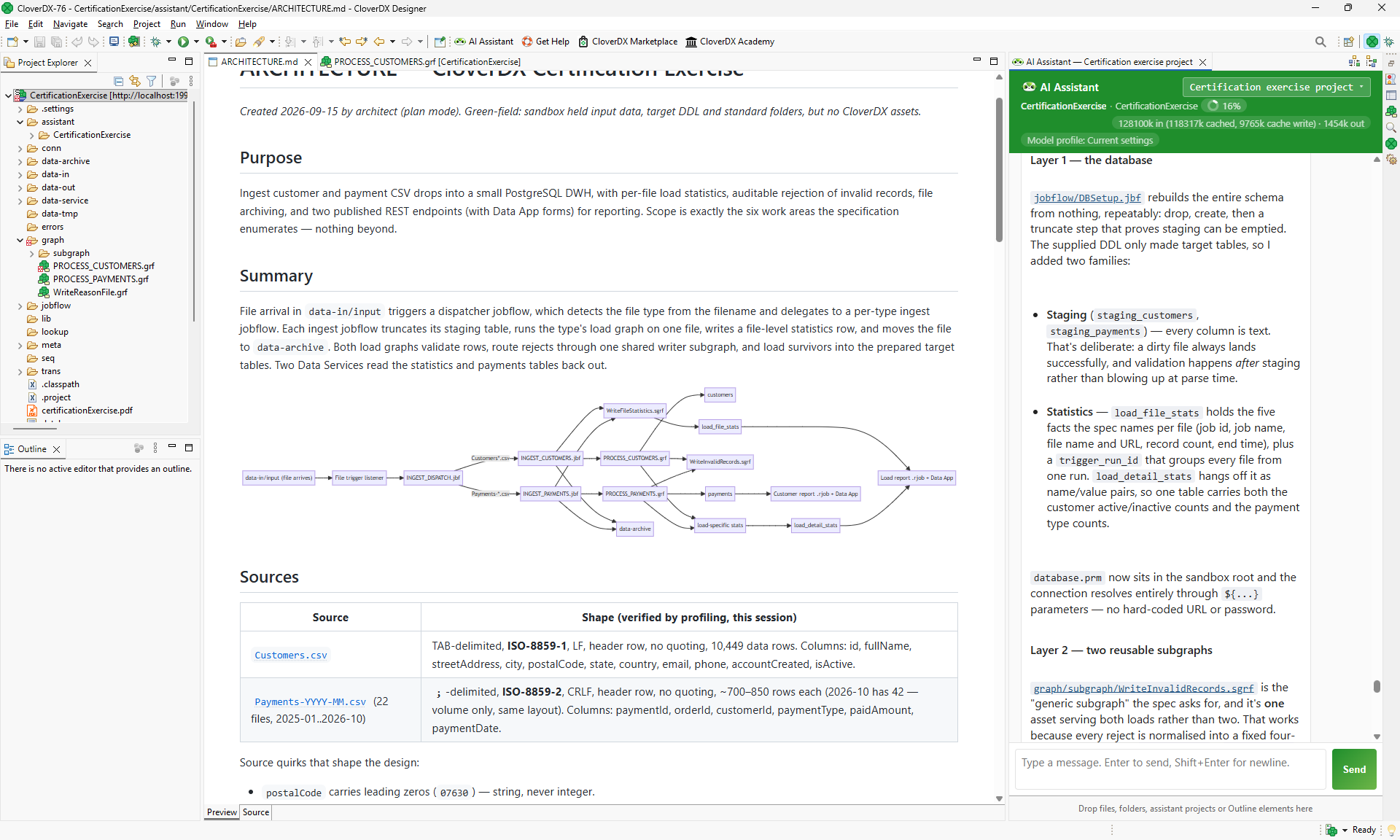
We’ve also implemented many other changes in the Assistant in this release. It now supports two new providers for your LLMs – Amazon Bedrock and DeepSeek. At the same time, we’ve extended its configuration so that you can configure reasoning effort for each agent if needed. The configuration itself is also easier to manage – you can export it as JSON file and import in another Designer.
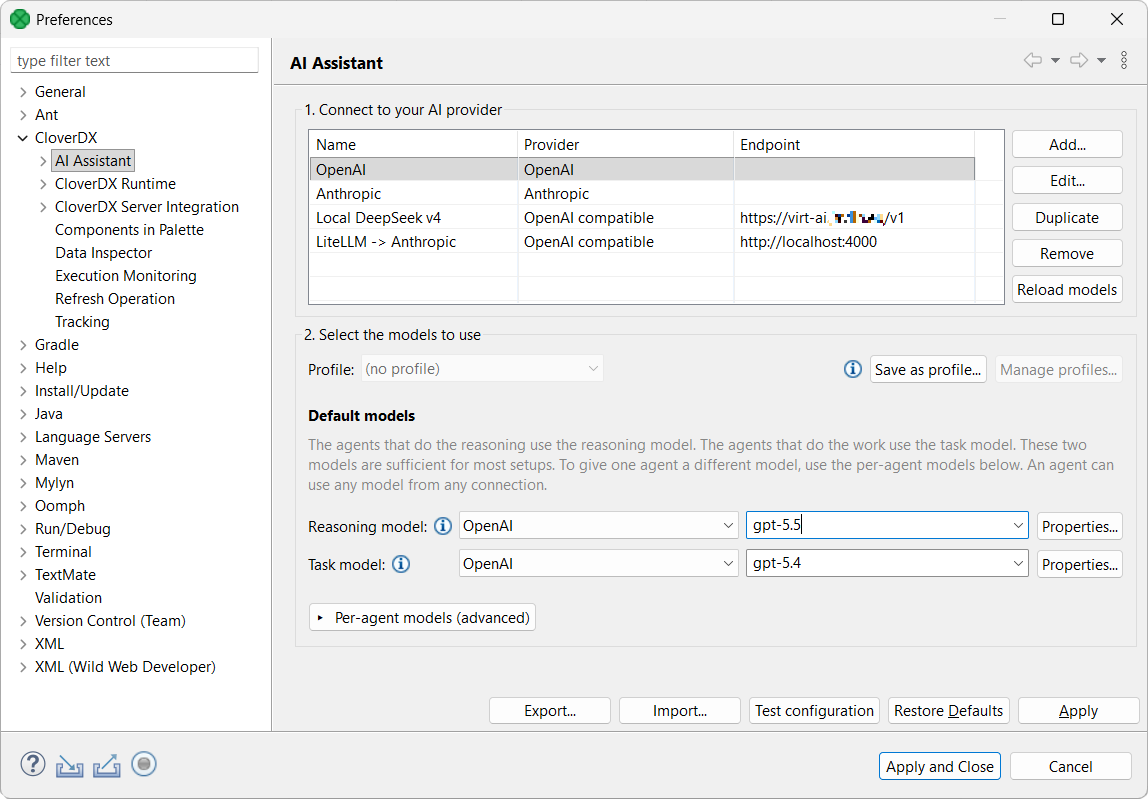
The Assistant is also smarter – it has better knowledge of CloverDX and you can also add your own Company knowledge to ensure it follows your naming patterns, job organization and more. Company knowledge is maintained in a sandbox where you can upload rules stored as Markdown files. The rules can be pinned to apply to all agents or restricted to just specific agents. You can also overload these rules in your Assistant project if needed.
MCP Server
MCP Server has been significantly improved as well. CloverDX can now act as its own authorization server making connections with external AI tools easier since you will no longer need to configure Entra ID or Google as IdP just for MCP – see more details about this in OAuth2 Profiles section below.
The MCP Server now has additional configuration available via Configuration -> Setup -> MCP Server configuration page. This includes new security settings that allow you to configure which kinds of files the MCP can access or not (allow-list and deny-list for file name patterns).
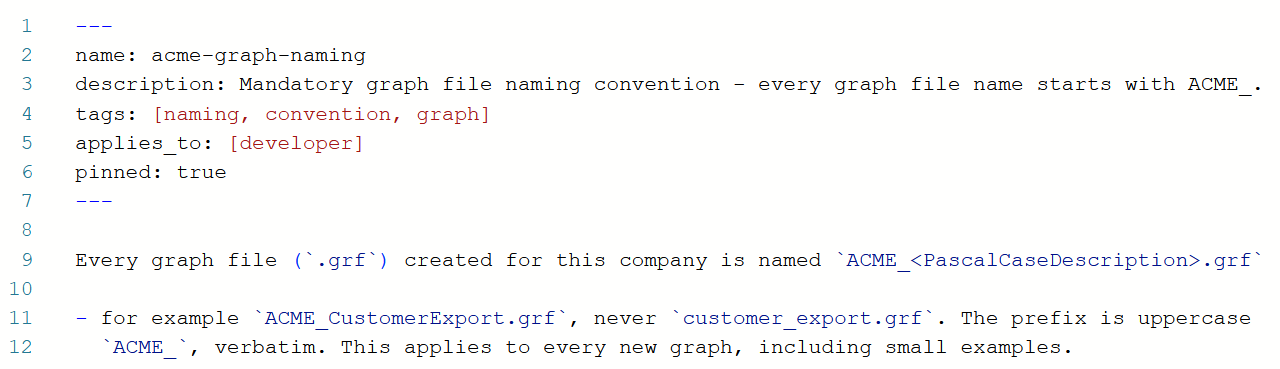
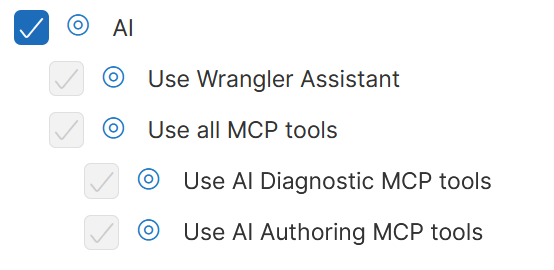
MCP tools have been reorganized and cleaned. Tools are now split into two categories – Diagnostic tools and AI Authoring tools – to better show their usage and impact. Diagnostic tools are available to all users with proper permissions and do not consume AI Authoring seats. AI Authoring tools have their own permission as well but also consume AI Authoring seats.
We have implemented several new tools that allow you to, for example, publish and configure data services, work with knowledge base and more.
At the same time, we’ve improved all existing tools – they are safer to use, more powerful and have more consistent interface to help agents call them more effectively.
Split view in Data Manager
Data Manager gets a new way of working with your data – you can now switch between Table view and a new Split view.
The split view shows a grid and adds a sidebar which allows you to work with your data more comfortably. This is especially useful if your data set has many columns – these fit better into the two-dimensional view in the sidebar compared to the grid.
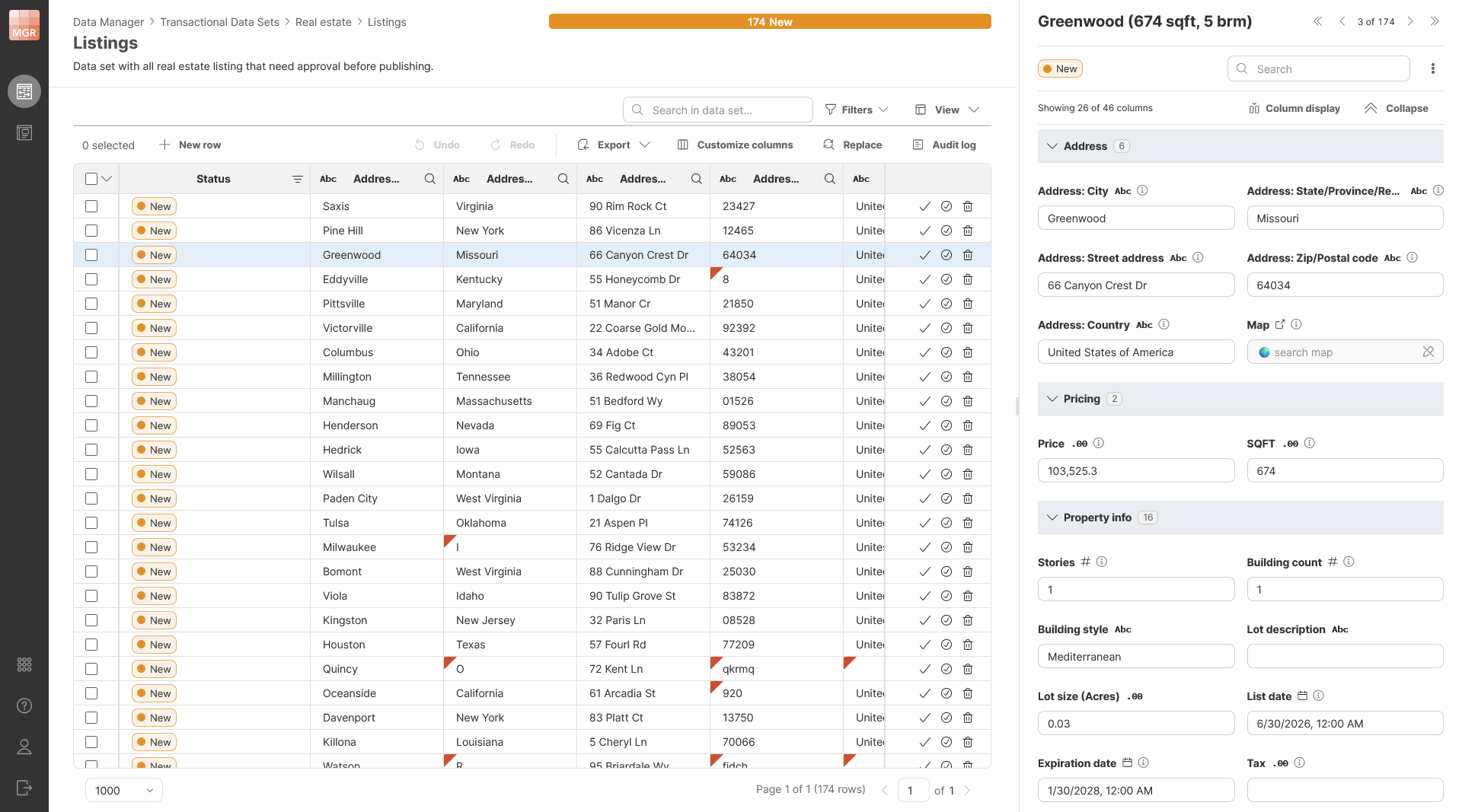
You can quickly move between columns and even different rows in the sidebar using keyboard shortcuts. This will help you work with your data faster and more effectively.
To further improve your ability to navigate your data, we are introducing Column groups. Column groups allow you to split your row into multiple groups for related columns – for example, you can have “Address” group for all columns related to an address and so on. The groups are then shown in the sidebar when working with your data to make it easier to see where you are, especially when you have many columns in your data set.
We are also introducing Row labels so that you can assign a “label” to each row in your data set. The label is computed on the fly as you work with your data based on values of columns in each row. The label is then shown in the sidebar and can help you quickly understand which row you are working with. As a simple example, consider row label configured to show real estate listing city, square footage and number of bedrooms. This allows you to see the listing’s basic information at the top of the sidebar without having to scroll back and forth as you are working on your data.
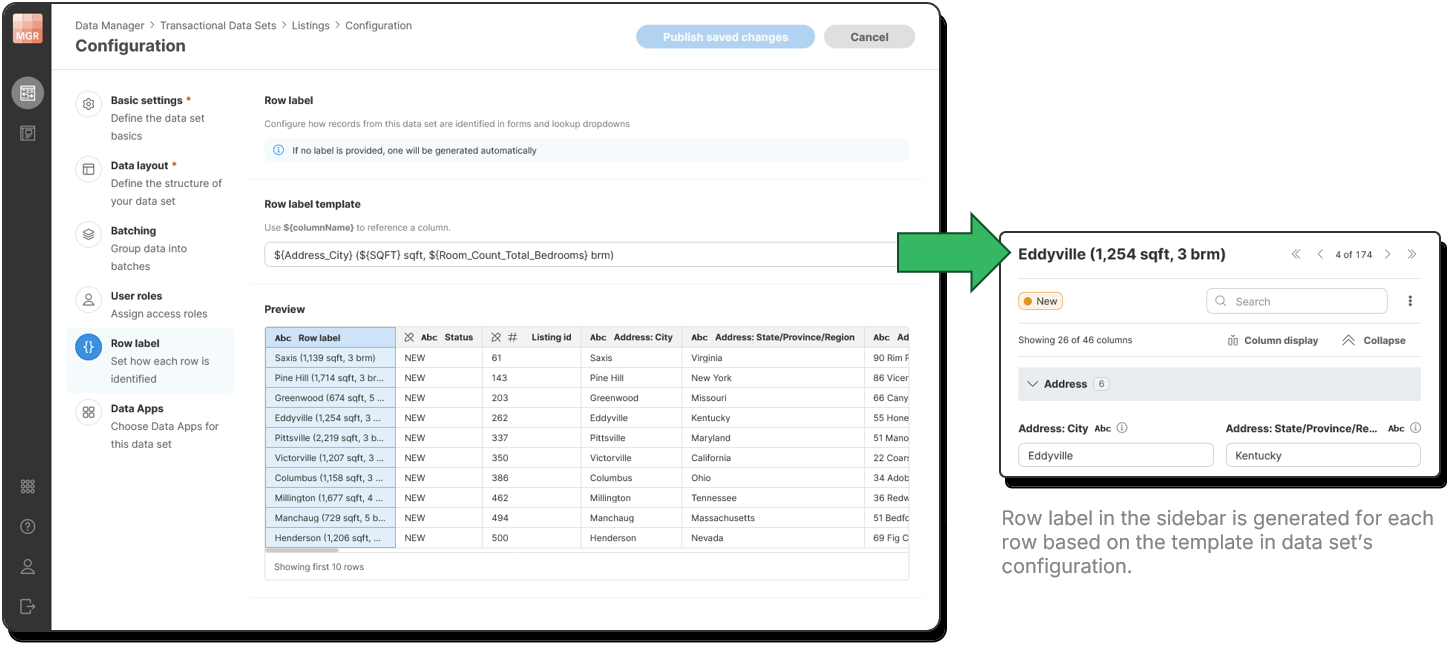
There are also many smaller changes across Data Manager to improve its usability and performance. For example, you can now create new rows or run connected Data Apps from batches page, access data set configuration or rename if directly from data editor, see data set description and more.
Categories in Wrangler and Data Catalog
You can now organize your jobs in Wrangler better by using categories. You can assign jobs into categories in similar way like you can assign data sets in Data Manager. Categories are shared between Wrangler and Data Manager so you can use the same names for your categories easily.
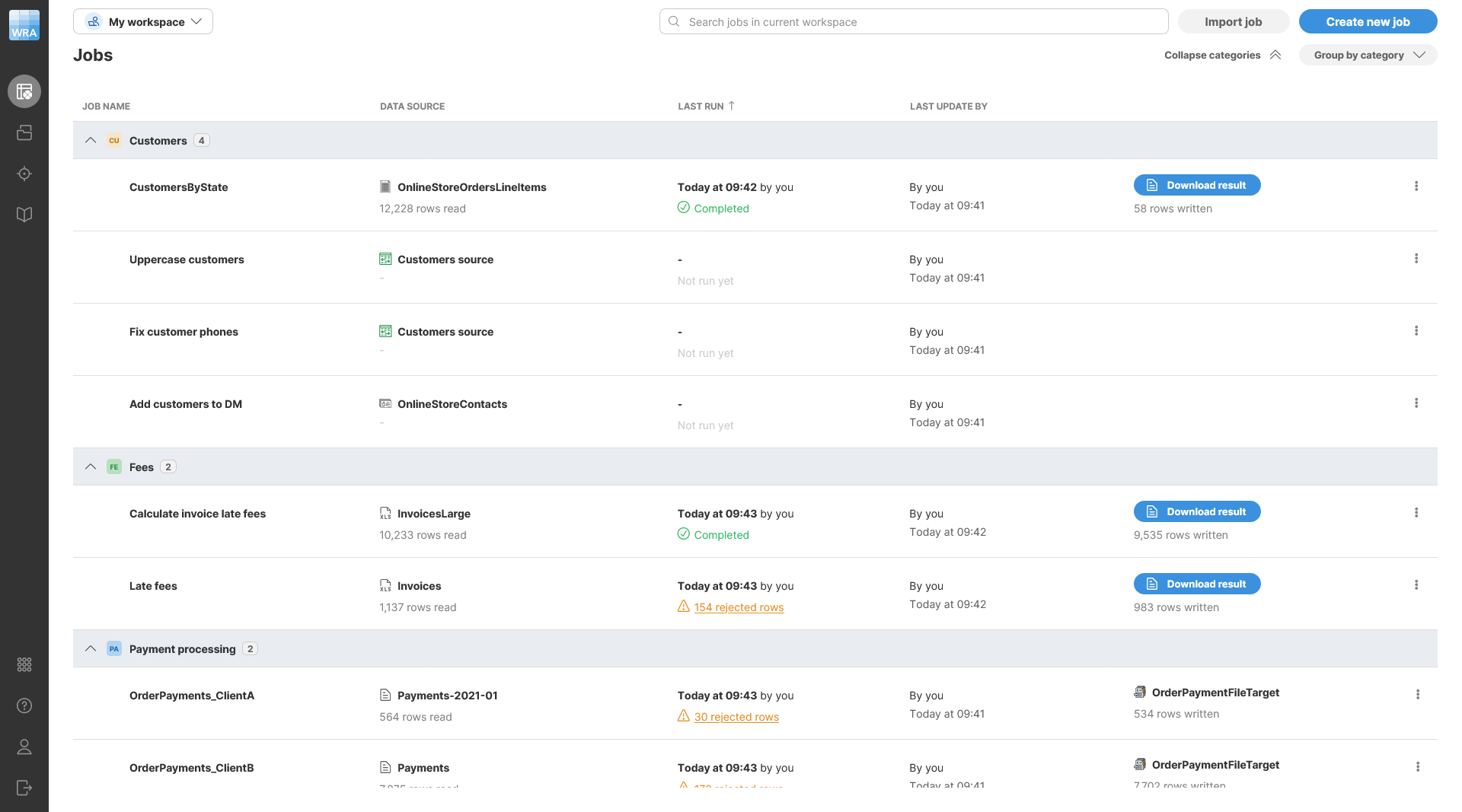
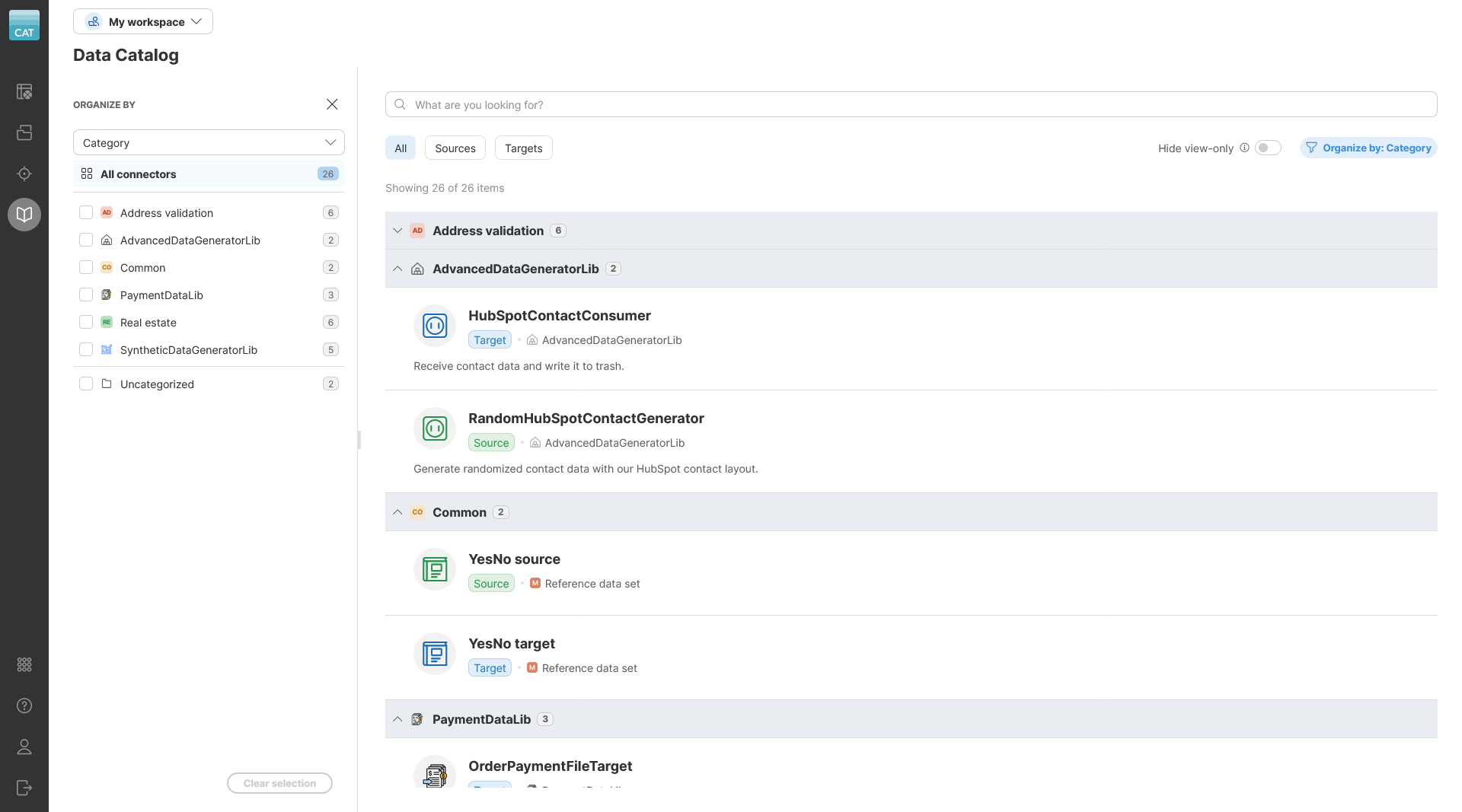
Since categories are now available in Data Manager and Wrangler, Data Catalog shows them too. It allows you to organize your connectors based on their category or based on their provider (which describes where each connector comes from). This will allow you to find your connectors faster especially in cases where you have hundreds of them.
OAuth2 profiles on Server and Built-in OAuth2 Provider
We’ve made significant improvements to OAuth2 in this release. Instead of just a single on/off switch that forces OAuth2 authentication for all Server APIs, you can create any number of OAuth2 profiles. Each profile represents one client application and one identity provider together with Server scopes for various APIs. There are four scopes you can use – MCP Server, Server REST API, Data Manager REST API, and Data Services.
You can configure as many profiles as you need on your Server – even covering the same APIs while using multiple identity providers. This allows you to, for example, set up a separate profile for each of your partners to access Data Services you publish for them. Your partners then do not have to share any secrets, and you can easily enable/disable them as needed.
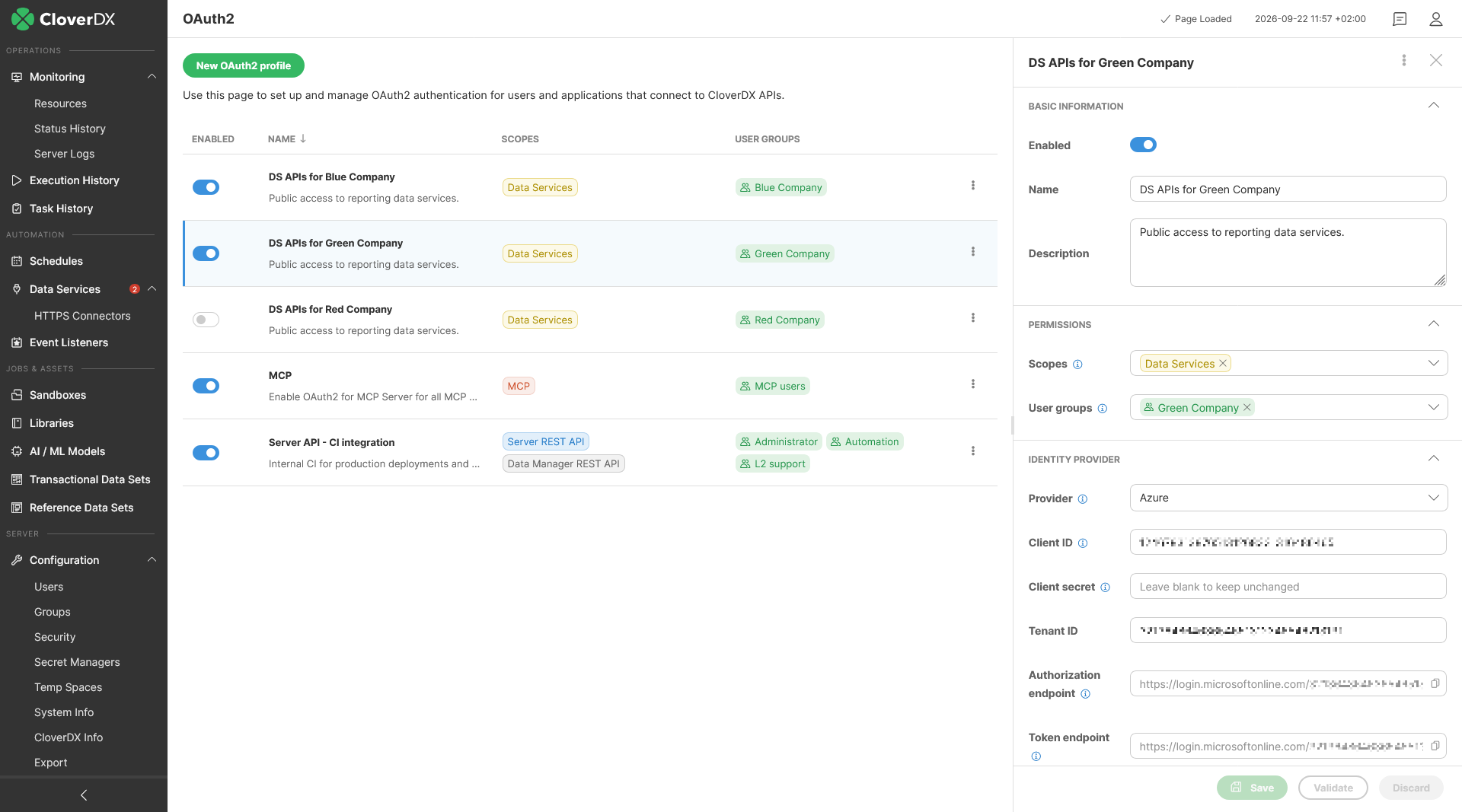
A common use case is to enable OAuth2 for MCP Server (which is required by all recent clients) and leave other APIs as HTTP Basic so that you can call them easily from your CI environment or from scripts.
To make this kind of usage much easier, we also added Built-in OAuth2 provider. With this provider you do not have to set-up any 3rd party tools such as Azure Entra ID – you can simply enable Built-in provider to allow your Agents and AI clients to easily connect to MCP Server.
CTL improvements
This release brings several improvements to CTL and to overall development process with editor improvements in Designer.
The biggest change is the ability for inline declarations of record types. You can now declare your own records for use in CTL code without having to create them as metadata in Designer. These record types can then be used just like any other record in code – as function parameters or return values, map elements, and more. Records declared like this come with type checking and validation preventing errors. This can then make your code easier to read and maintain as it can help you avoid using variants for the same purpose.
Read more about what you can use in record declarations (e.g., the ability to have “not null” constraint) in our documentation.
Note that the record declaration and the new rules for record assignment can cause backwards incompatibility – assignment of different record types that could lead to silent data loss in previous versions of CloverDX will result in an error in this version.
We’ve also added ability to have documentation comments for your CTL functions, record types or variable declarations. You can use tags like @param, @return, etc. to describe your function’s interface. Content Assist in Designer understands these comments and will show them to you in various content. You can also quickly generate these comments for entity under cursor using Ctrl+Alt+J keyboard shortcut.
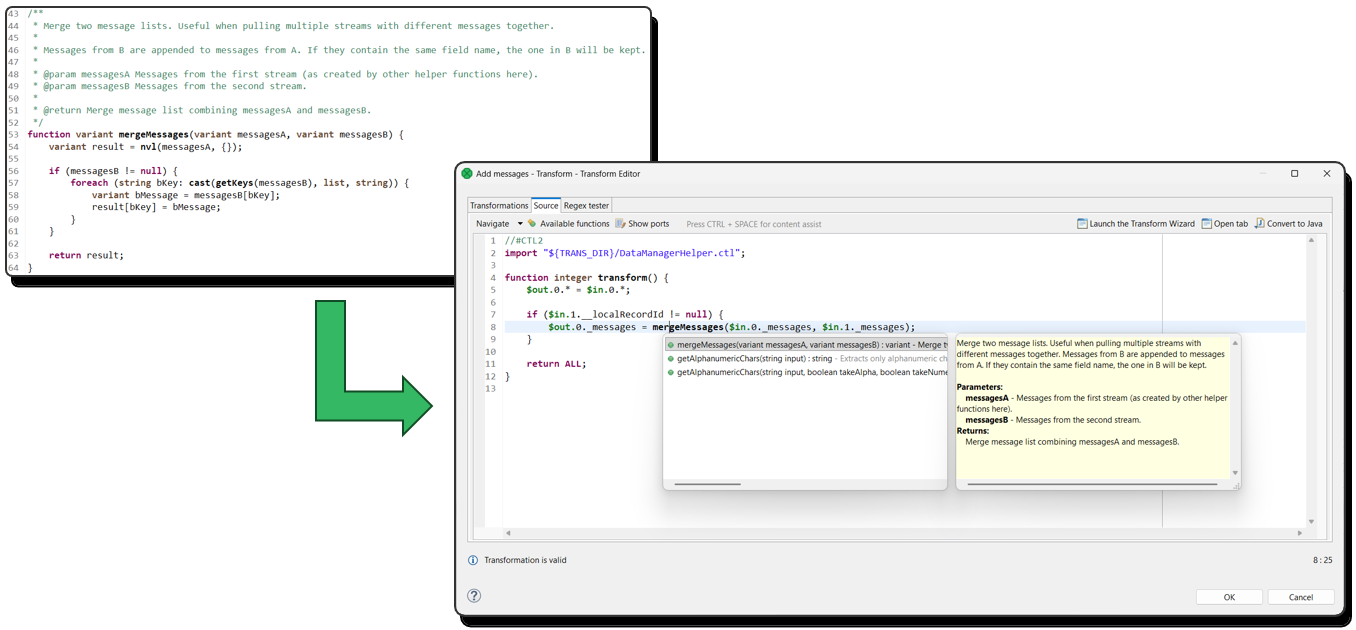
We’ve made further improvements to content assist in CTL editors – content assist now understands containers, lookups and record types. It can work better with function calls and ranks proposals by type. It will also offer file import proposals and more. You can show a new outline popup with Ctrl+O keyboard shortcut.
Other changes
SAML signing
New properties allow for more detailed SAML configuration and signing of SAML messages. This provides increased security for your SAML setup. See the full list of these properties in our documentation SAML Authentication.
Wrangler Assistant improvements
It now uses GPT 5.4 by default and its internal prompts have been improved to produce better and more reliable outputs.
Improved Wrangler previews
Previews are now generated automatically when you change step properties instead of requiring you to click on Generate preview button. This significantly improves experience of working with Wrangler. Previews are also faster and nicely highlight group and step conditions.
JSONWriter component
A new Skip empty arrays attribute tells the component not to serialize empty arrays into the output. It does not affect variants. Default value is false, so existing jobs do not need to be modified and will behave as in previous versions.
SpreadsheetWriter component
We’ve added a new Exclude fields attribute which names fields that will not be written to the output spreadsheet.
AIClient component
Now supports Amazon Bedrock and DeepSeek LLM providers.
Edge routing in Designer
Improved algorithm will lead to cleaner graphs with fewer edge overlaps, cleaner parallel edge routing and more. The new algorithm does not have any impact on job XML files – just their visual presentation. This means that it will not generate unnecessary changes in your version control.
To help you install or upgrade to this version, we've prepared a simple checklist:
Before you upgrade
- Be sure to check the "Compatibility" notes for ALL intermediary releases. We mark all changes that can potentially alter the function of your existing transformations with a "Compatibility" label. Typically, you can safely ignore most of them, as we try hard to keep as much backwards compatibility as possible. There's a comprehensive list of all releases that will help you get the information quickly.
- Upgrade Designer and Server together. We always release Designer and Server together under a single version. It's highly recommended to upgrade Server and all Designers at the same time. Although using different versions of Designer to connect to Server might work, it is not generally supported.
- There are no incremental patches. We don't release incremental patches. Every upgrade is in fact a full installation that, if installed over the older version, will automatically update whatever is necessary in your workspaces, sandboxes, and Server databases as needed, no user data will get overwritten.
- Don't forget to backup. Although none of the above upgrade steps requires explicit backup, we recommend you always back up your work. The upgrade will keep all your transformations, jobflows, and configurations safe. However, as a good word of advice, it never hurts to have a backup.
Designer upgrade
- Download the latest version by logging into your customer account. If you lost your credentials or no longer have access there, click here to recover your password or contact our CloverCARE Support.
- Install the new version of Designer. You can install Designer over your existing installation. The process will automatically clean up the old version. Don't worry, you will NOT lose your workspaces, graphs, and transformations. However, if you installed some additional plugins to Designer (Eclipse plugins) you might need to reinstall them. Eclipse should automatically help you do that. When you start the application, point it to your existing workspace directory. With some major releases, we may notify you about upgrading the workspace to the latest version. In such cases, you won't be able to use the workspace with previous versions—be sure to upgrade ALL Designers at once if you're sharing the workspace.
- Activate the product on first start. You will need a new key as we issue new license keys for every new major version (e.g. from 4.9 to 5.0). If you're on our maintenance program, we automatically renew the keys for you. Just go to the License Keys again and copy/paste the license keys from there. If you can't find the latest keys, please contact us to renew your product maintenance.
Server upgrade:
- Download the latest version by logging into your customer account. You'll find Server in the same list as Designer downloads. If you no longer have access there, click here to recover your password or contact our CloverCARE Support.
- Plan for downtime. Upgrading Server requires downtime, so plan your upgrades in advance. If you're running multiple environments, upgrade the non-production installation first and run all your tests there first.
- Follow our step-by-step Server Upgrade Guide. We've prepared detailed instructions on how to properly shut down Server and install a new one. Server will upgrade its database and sandboxes from any previous version automatically.
- Activate the product on the login screen of Server Console. Server requires new license keys with every minor version (e.g. from 4.9 to 5.0) and we automatically renew the keys for you. Just go to the License Keys again and copy/paste the license key from there.
Please consult our Upgrading to CloverDX Server 7.0 article for additional details with more detailed overview of how to upgrade from Apache Tomcat 9 to Apache Tomcat 10.1.
| Release | Compatibility/Upgrade notes, Features & Fixes | Published | Download | ||||||||||||||||||||||||||||||||||||||||||||||||||||||||||||||||||||||||||||||||||||||||||||||||||||||||||||||||||||||||||||||||||||||||
|---|---|---|---|---|---|---|---|---|---|---|---|---|---|---|---|---|---|---|---|---|---|---|---|---|---|---|---|---|---|---|---|---|---|---|---|---|---|---|---|---|---|---|---|---|---|---|---|---|---|---|---|---|---|---|---|---|---|---|---|---|---|---|---|---|---|---|---|---|---|---|---|---|---|---|---|---|---|---|---|---|---|---|---|---|---|---|---|---|---|---|---|---|---|---|---|---|---|---|---|---|---|---|---|---|---|---|---|---|---|---|---|---|---|---|---|---|---|---|---|---|---|---|---|---|---|---|---|---|---|---|---|---|---|---|---|---|---|---|---|
CloverDX AI Assistant & MCP Server
Business Tools
CTL Improvements
Security
Miscellaneous
Fixes
Compatibility
|
September 22, 2026 | Documentation Download CloverDX 7.6 7.6.0 | |||||||||||||||||||||||||||||||||||||||||||||||||||||||||||||||||||||||||||||||||||||||||||||||||||||||||||||||||||||||||||||||||||||||||
- For Developers (Improvements most useful for developers bringing new functionality or optimizations in data transformation and orchestration)
- For Administrators (Improvements or features that will help setup, install, administer and manage the platform)
- For Support (Helps staff supporting the production environment to identify and escalate potential problems or avoid such)
- For Security (Improvements and changes relevant to security focused staff – sys admins and developers alike)